







Question: 8 . 4 Multidimensional Arrays S 3 5 Tutorial 8 - 6 : Completing the Seating Chart application In this tutorial, you will complete the
Multidimensional Arrays
S
Tutorial :
Completing the Seating Chart application
In this tutorial, you will complete the Seating Chart application. When completed, the application will display an airplane seating chart and allow the user to select a seat number. The application will display the price of the selected seat.
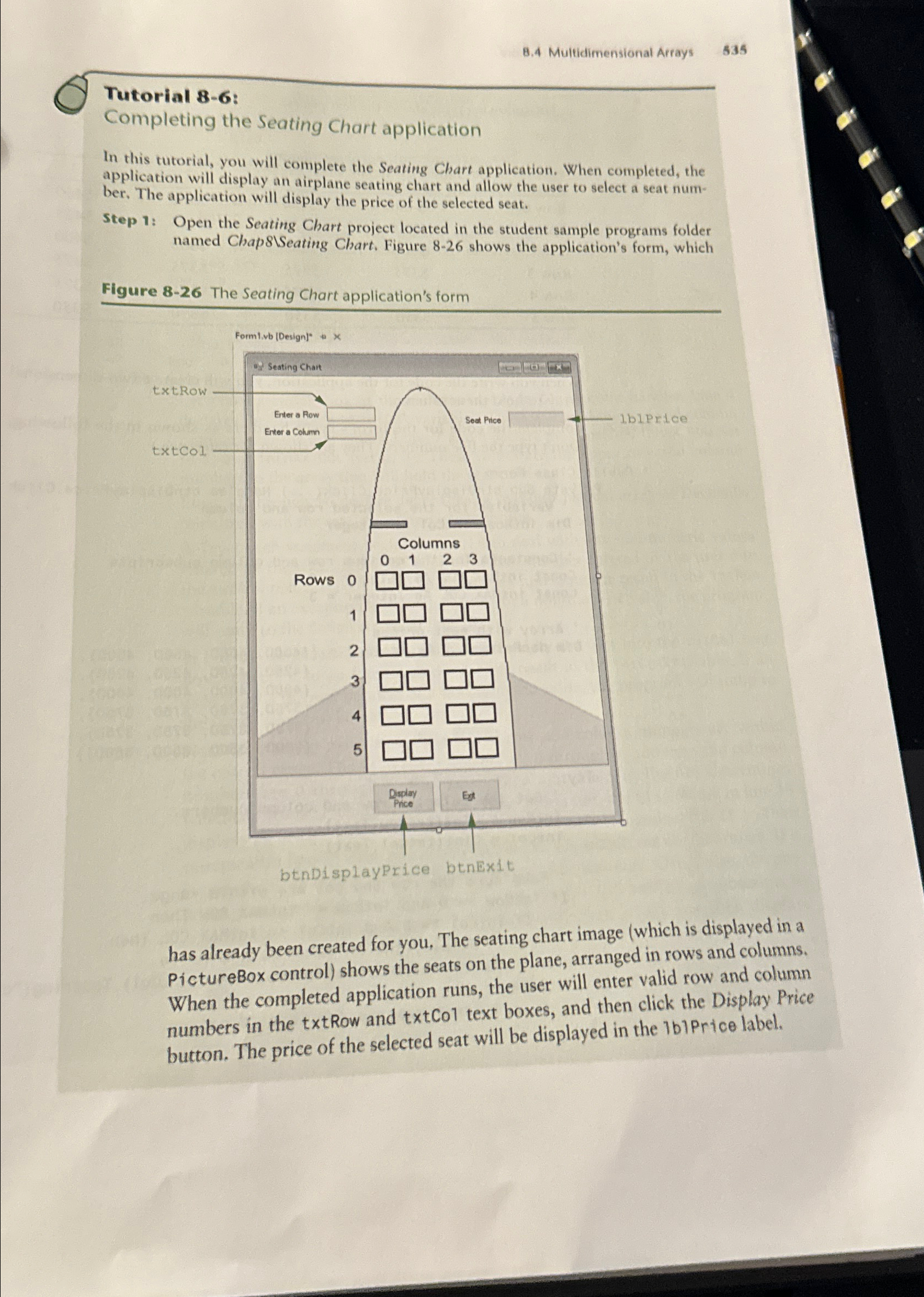
Step : Open the Seating Chart project located in the student sample programs folder named Chap Seating Chart. Figure shows the application's form, which
Figure The Seating Chart application's form
has already been created for you. The seating chart image which is displayed in a PictureBox control shows the seats on the plane, arranged in rows and columns. When the completed application runs, the user will enter valid row and column numbers in the Row and text boxes, and then click the Display Price button. The price of the selected seat will be displayed in the IbiPrice label.
Step by Step Solution
There are 3 Steps involved in it
1 Expert Approved Answer
Step: 1 Unlock

Question Has Been Solved by an Expert!
Get step-by-step solutions from verified subject matter experts
Step: 2 Unlock
Step: 3 Unlock
 Study Help