







Question: 8 Sort the table by Agent Name in alphabetical order, add a second level to sort by Description, and create a custom sort order as
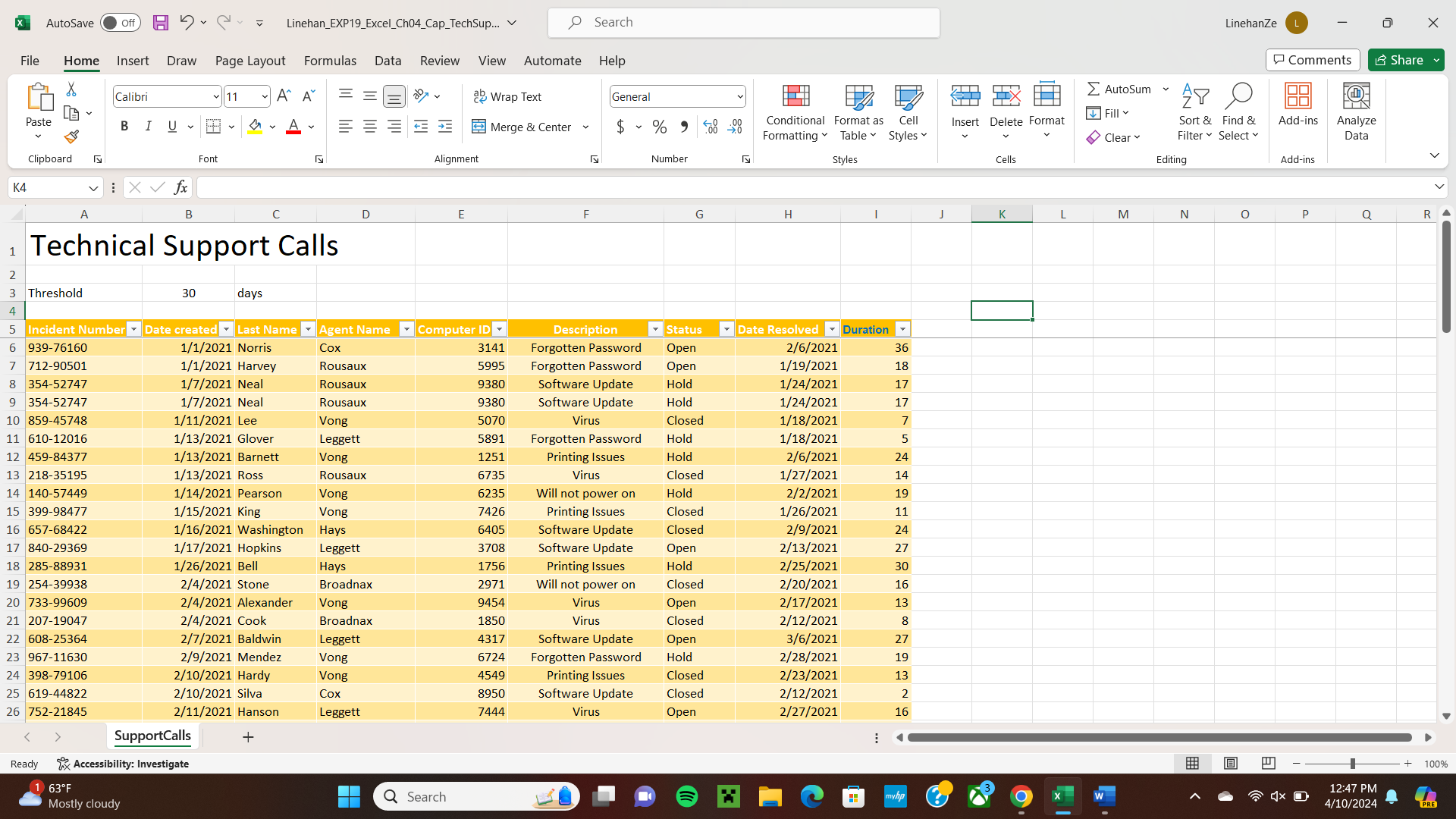
Sort the table by Agent Name in alphabetical order, add a second level to sort by Description, and create a custom sort order as follows: Will not power on Virus, Printing Issues, Software Update, Forgotten Password. Add a third level to sort by Duration smallest to largest.
Mac users, to create the custom list, from the Excel menu, click Preferences. In the dialog box, click Custom Lists.
Filter the table to only display closed incidents as indicated in the status column.
Use Quick Analysis to apply the default Data Bars conditional formatting Solid Blue Fill to the Duration column range I:I Mac users, on the Home tab, click Conditional Formatting, point to Data Bars, and under Solid Fill, click Blue Data Bar.
Create a new conditional format that applies Red fill and bold font to incident range A:A that required or more days to resolve. Be sure to use relative cell references in the conditional format formula.
Change page breaks so page begins with the Computer ID column column E
Step by Step Solution
There are 3 Steps involved in it
1 Expert Approved Answer
Step: 1 Unlock

Question Has Been Solved by an Expert!
Get step-by-step solutions from verified subject matter experts
Step: 2 Unlock
Step: 3 Unlock
 Study Help