







Question: 8. The Excel file Portfolio Weights Data contains information about two portfolios. a. Using Matrix Algebra compute the portfolio asset weights for Portfolio Cif Portfolio
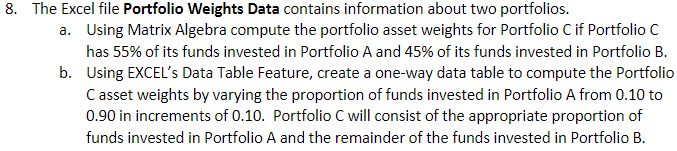
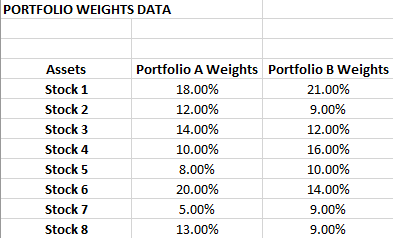
8. The Excel file Portfolio Weights Data contains information about two portfolios. a. Using Matrix Algebra compute the portfolio asset weights for Portfolio Cif Portfolio C has 55% of its funds invested in Portfolio A and 45% of its funds invested in Portfolio B. b. Using EXCEL's Data Table Feature, create a one-way data table to compute the Portfolio Casset weights by varying the proportion of funds invested in Portfolio A from 0.10 to 0.90 in increments of 0.10. Portfolio C will consist of the appropriate proportion of funds invested in Portfolio A and the remainder of the funds invested in Portfolio B. PORTFOLIO WEIGHTS DATA Assets Stock 1 Stock 2 Stock 3 Stock 4 Stock 5 Stock 6 Stock 7 Stock 8 Portfolio A Weights Portfolio B Weights 18.00% 21.00% 12.00% 9.00% 14.00% 12.00% 10.00% 16.00% 8.00% 10.00% 20.00% 14.00% 5.00% 9.00% 13.00% 9.00% 8. The Excel file Portfolio Weights Data contains information about two portfolios. a. Using Matrix Algebra compute the portfolio asset weights for Portfolio Cif Portfolio C has 55% of its funds invested in Portfolio A and 45% of its funds invested in Portfolio B. b. Using EXCEL's Data Table Feature, create a one-way data table to compute the Portfolio Casset weights by varying the proportion of funds invested in Portfolio A from 0.10 to 0.90 in increments of 0.10. Portfolio C will consist of the appropriate proportion of funds invested in Portfolio A and the remainder of the funds invested in Portfolio B. PORTFOLIO WEIGHTS DATA Assets Stock 1 Stock 2 Stock 3 Stock 4 Stock 5 Stock 6 Stock 7 Stock 8 Portfolio A Weights Portfolio B Weights 18.00% 21.00% 12.00% 9.00% 14.00% 12.00% 10.00% 16.00% 8.00% 10.00% 20.00% 14.00% 5.00% 9.00% 13.00% 9.00%
Step by Step Solution
There are 3 Steps involved in it

Get step-by-step solutions from verified subject matter experts
 Study Help