







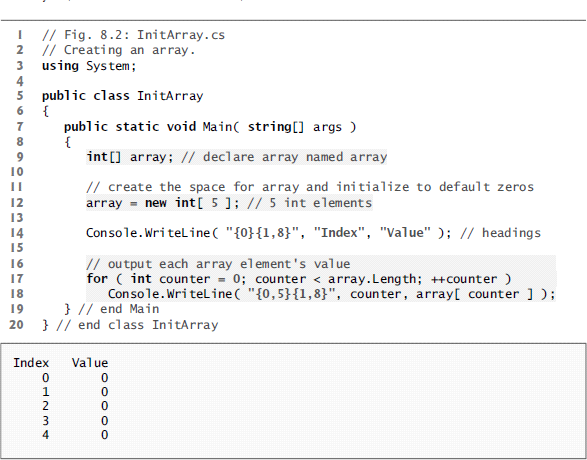
Question: 8.15 (Command-Line Arguments) Rewrite Fig. 8.2 so that the arrays size is specified by the first command-line argument. If no command-line argument is supplied, use
8.15 (Command-Line Arguments) Rewrite Fig. 8.2 so that the arrays size is specified by the first command-line argument. If no command-line argument is supplied, use 10 as the default size.
C# code only please. Thanks!
I Fig. 8.2 InitArray.cs 2 Creating an array. 3 using System; 5 public class I nitArray 7 public static void Main( string args) intCJ array declare array named array 10 create the space for array and initialize to default zeros 12 array new int 5 5 int elements 13 Console. WriteLine C "H0H1, 8H Index Value" headings 14 15 16 output each array element's value 17 for int counter 0; Counter array .Length; counter Console. WriteLine C "10,5H1,81 Counter array[ counter J 18 19 end Main 20 end class InitArray Index Value
Step by Step Solution
There are 3 Steps involved in it

Get step-by-step solutions from verified subject matter experts
 Study Help