





Question: 9 1 Start Access. Open the downloaded Access file named Exp19 Access Chas Cap Briton Madley Games.aced Grader has automatically added your last name to

9 9 1 Start Access. Open the downloaded Access file
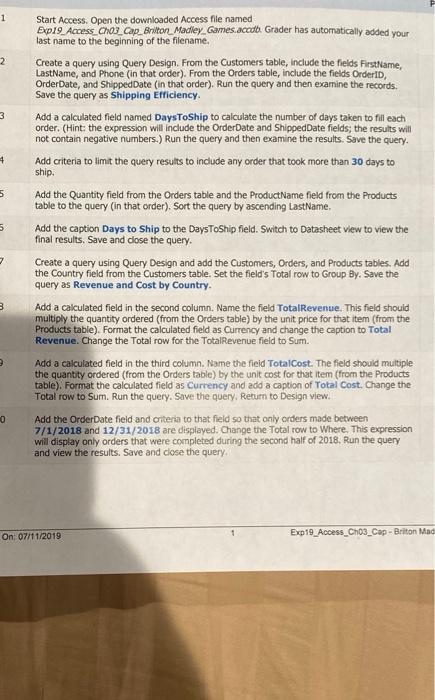
1 Start Access. Open the downloaded Access file named Exp19 Access Chas Cap Briton Madley Games.aced Grader has automatically added your last name to the beginning of the filename. 2 Create a query using Query Design. From the Customers table, include the fields FirstName, LastName, and Phone (in that order). From the Orders table, include the fields OrderID, Order Date, and shipped Date (in that order). Run the query and then examine the records, Save the query as Shipping Efficiency 3 Add a calculated field named DaysToShip to calculate the number of days taken to fill each order. (Hint: the expression will include the Order Date and Shipped Date fields, the results will not contain negative numbers.) Run the query and then examine the results. Save the query. 4 Add criteria to limit the query results to include any order that took more than 30 days to ship. 5 Add the Quantity field from the Orders table and the Product Name field from the Products table to the query (in that order), Sort the query by ascending LastName. 5 Add the caption Days to Ship to the DaysToShip field. Switch to Datasheet view to view the final results. Save and close the query. 7 3 Create a query using Query Design and add the Customers, Orders, and Products tables. Add the Country field from the Customers table. Set the field's Total row to Group By. Save the query as Revenue and Cost by Country Add a calculated field in the second column. Name the field TotalRevenue. This field should multiply the quantity ordered (from the Orders table) by the unit price for that item (from the Products table). Format the calculated field as Currency and change the caption to Total Revenue. Change the Total row for the TotalRevenue field to Sum. Add a calculated field in the third column. Name the field TotalCost. The field should multiple the quantity ordered (from the Orders table) by the unit cost for that item (from the Products table). Format the calculated field as Currency and add a caption of Total Cost. Change the Total row to Sum. Run the query. Save the query. Return to Design view. Add the Order Date field and criteria to that field so that only orders made between 7/1/2018 and 12/31/2018 are displayed. Change the Total row to Where. This expression will display only orders that were completed during the second half of 2018. Run the query and view the results. Save and close the query 0 On: 07/11/2019 1 Exp19_Access Chos_Cap - Briton Mad

Step by Step Solution

There are 3 Steps involved in it

1 Expert Approved Answer
Step: 1 Unlock blur-text-image

Question Has Been Solved by an Expert!

Get step-by-step solutions from verified subject matter experts

Step: 2 Unlock
Step: 3 Unlock

Students Have Also Explored These Related General Management Questions!