







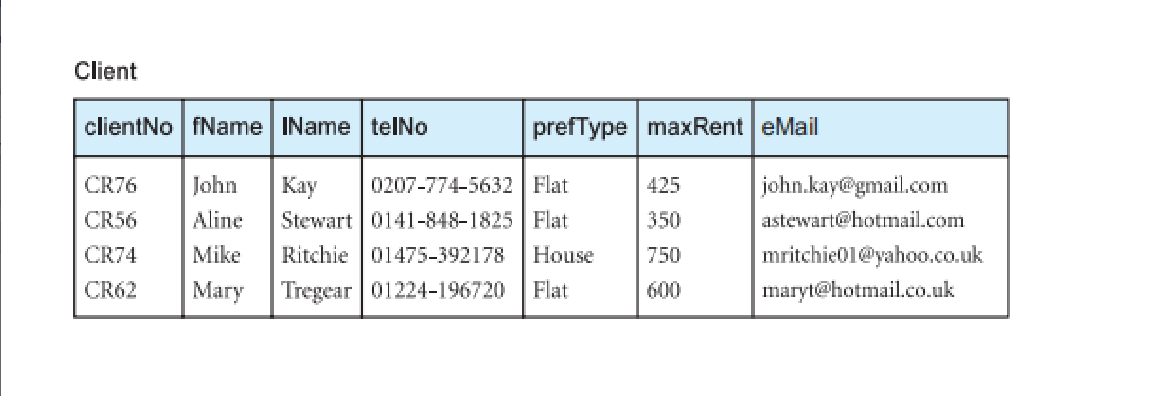
Question: 9. The problem is to write a query to display total number of clients. (DreamHome db) A student give the answer: Select count(clients) from clients;
9. The problem is to write a query to display total number of clients. (DreamHome db)
A student give the answer: Select count(clients) from clients;
Which of the following are the mistakes he made? (There are more than one!)
1. it should be count(clientNo)
2. should have group by
3. used non-existing table
4. used non-existing field
5. should use sum
6. it should be count(*)
10. The problem is to write a query to display the branch numbers and the total salary paid to people working there. A student give the answer: SELECT branch, Count(*), totalsalary FROM Staff WHERE staff has 'branchnumber'
Which of the following are the mistakes he made? (There are more than one!)
1. used non-existing table
2. used non-existing fields more than once
3. should have group by
4. there is no order by
5. should not have where clause
6. used non-existing field, only once
7. condition in where clause is not a boolean expression
8. should use sum(*)
9. should not use count
10. the group function is applied to wrong field
11. Write a query to list all clients whose email address are with g mail account.
12. Write a query to list names of guests who do not have an address in the database.
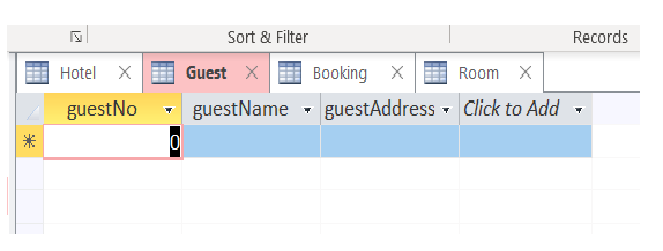
Client clientNo fName IName telNo prefType maxRent eMail CR76 425 350 CR56 CR74 John Aline Mike Mary Kay 0207-774-5632 Flat Stewart 0141-848-1825 Flat Ritchie 01475-392178 House Tregear 01224-196720 Flat john.kay@gmail.com astewart@hotmail.com mritchie01@yahoo.co.uk maryt@hotmail.co.uk 750 CR62 600 Sort & Filter Records Hotel X Guest X Booking X Room X guestAddress - Click to Add guestNo guestName 0
Step by Step Solution
There are 3 Steps involved in it

Get step-by-step solutions from verified subject matter experts
 Study Help