







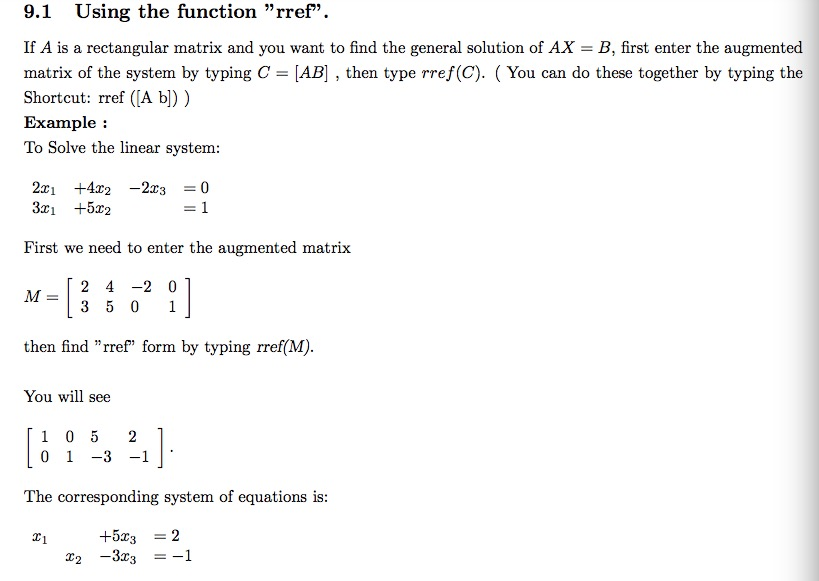
Question: 9.1 Using the function rref. If A is a rectangular matrix and you want to find the general solution of AX = B, first enter

![first enter the augmented matrix of the system by typing C -AB]](https://dsd5zvtm8ll6.cloudfront.net/si.experts.images/questions/2024/09/66eed3d549f68_82866eed3d4a7bff.jpg)
9.1 Using the function "rref". If A is a rectangular matrix and you want to find the general solution of AX = B, first enter the augmented matrix of the system by typing C -AB] , then type rref(C). You can do these together by typing the Shortcut: rref ([A b) ) Example: To Solve the linear system First we need to enter the augmented matrix 2 4 -2 0 then find "rref" form by typing rref(M) You will see 1 0 52 0 13 -1 The corresponding system of equations is +532 If you type X [2 4-2; 35 0 [0; 1 MATLAB will give you only particular solution. Now type the coefficient matrix: AC 2 4 2;3 5 0;4 8 -4 and the constant matrix as b- 0 1 3 then use MATLAB's command Type X - AC How do you Interpret MATLAB's output? in coldren sa ur liir r b Example: Enter Type: A2 3. and 1-1 -21 Type:B43 6 7 ]. To solve this system, Type X A\ B Check the answer Using rref Method in section 9.1
Step by Step Solution
There are 3 Steps involved in it

Get step-by-step solutions from verified subject matter experts
 Study Help