







Question: A. Analyze the network design. Choose the right system devices for project implementation by using Packet Tracer. Update the physical topology map based on
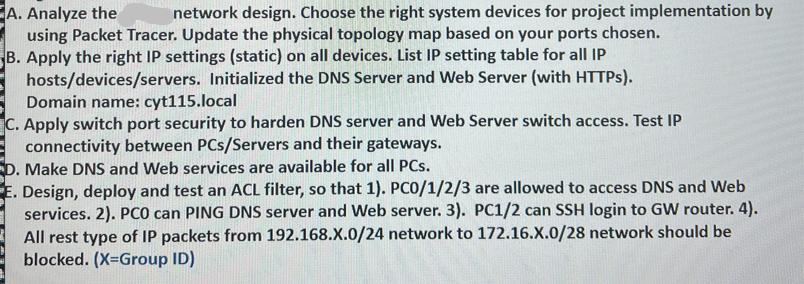
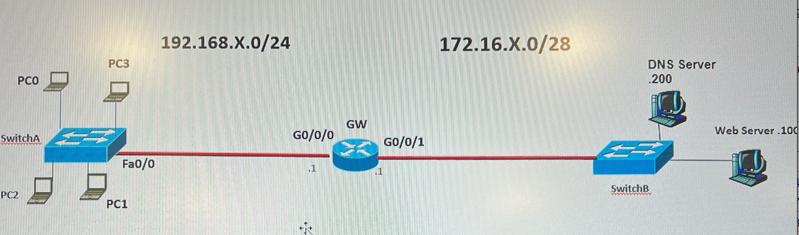
A. Analyze the network design. Choose the right system devices for project implementation by using Packet Tracer. Update the physical topology map based on your ports chosen. B. Apply the right IP settings (static) on all devices. List IP setting table for all IP hosts/devices/servers. Initialized the DNS Server and Web Server (with HTTPs). Domain name: cyt115.local C. Apply switch port security to harden DNS server and Web Server switch access. Test IP connectivity between PCs/Servers and their gateways. D. Make DNS and Web services are available for all PCs. E. Design, deploy and test an ACL filter, so that 1). PC0/1/2/3 are allowed to access DNS and Web services. 2). PCO can PING DNS server and Web server. 3). PC1/2 can SSH login to GW router. 4). All rest type of IP packets from 192.168.X.0/24 network to 172.16.X.0/28 network should be blocked. (X=Group ID) PCO SwitchA PC2 PC3 Fa0/0 PC1 192.168.X.0/24 GO/0/0 ** GW GO/0/1 172.16.X.0/28 DNS Server 200 SwitchB Web Server 100
Step by Step Solution
There are 3 Steps involved in it
I can provide assistance with the network design as described in the question by providing a general guideline on how to address each point A Analyze the network design Look at the provided network topology to ensure it meets the needs of the scenario Choose appropriate network devices routers switches and ensure that they correctly connect different network segments Ensure redundancy and scalability in the design if required B Apply the right IP settings static on all devices Assign static IP addresses to all devices subnetting the given IP ranges according to the number of hosts required per segment The devices in the 192168X024 network might have IP addresses ranging from 192168X1 to 192168X254 with the gateway GW having an interface in this range as well Similarly devices in the 17216X028 network might have IPs from 17216X1 to 17216X14 since 28 allows for 16 IP addresses in total with 2 reserved for network address and broadcast C Apply switch port security On the switches configure port security to limit the number of MAC addresses that can connect through a port preventing unauthorized access You can also configure additional features like sticky MAC or MAC address whitelisting for stricter control D Make DNS and Web services available for all PCs Ensure DNS and web server IPs are properly configured and reachable from all PCs in the network Implement appropriate routing and switching rules for connectivity between different segments E Design deploy and test ACL filter Configure an Access Control List ACL on the router to meet the specified requirements 1 Permit PC0123 access to DNS and Web services 2 Allow PC0 to ping the DNS server and Web server 3 Permit PC12 to SSH into the gateway router 4 Block all other IP traffic from the 192168X024 network to ... View full answer

Get step-by-step solutions from verified subject matter experts
 Study Help