







Question: A B B D E F G w N 4 5 Year Month 2019 Mar 4 5 6 7 8 12 Month Sales Report as
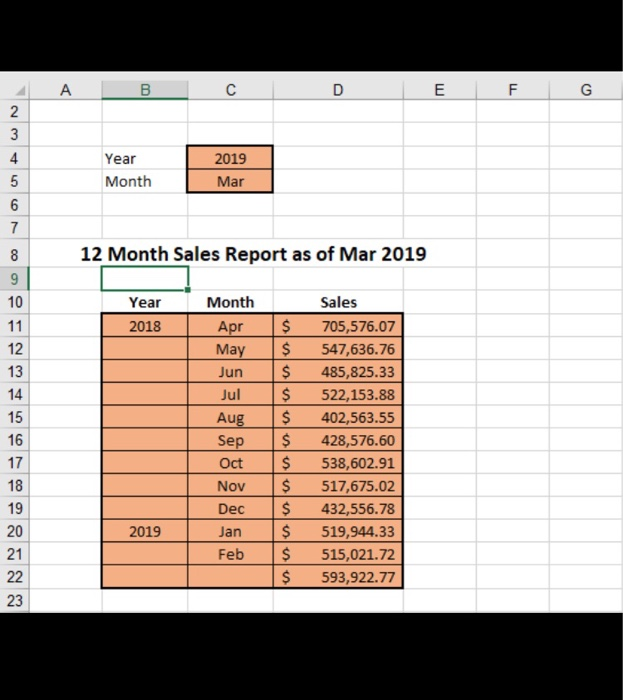
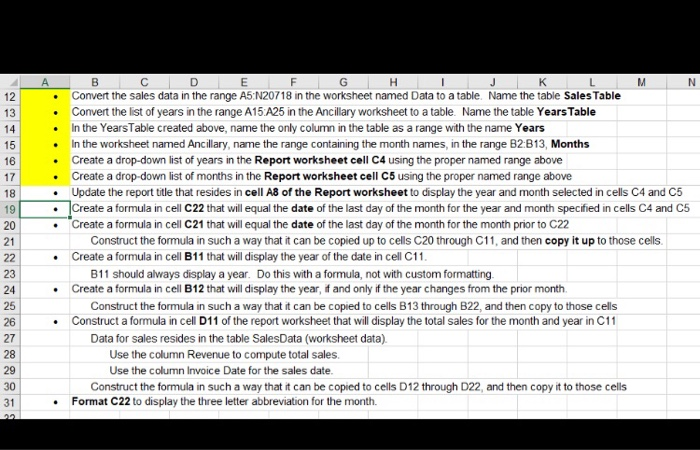
A B B D E F G w N 4 5 Year Month 2019 Mar 4 5 6 7 8 12 Month Sales Report as of Mar 2019 Year 2018 8 9 10 11 12 13 14 15 16 17 18 19 20 21 Month Apr May Jun Jul Aug Sep Oct Nov Dec Jan Feb $ $ $ $ $ $ $ $ $ $ $ $ Sales 705,576.07 547,636.76 485,825.33 522,153.88 402,563.55 428,576.60 538,602.91 517,675.02 432,556.78 519,944.33 515,021.72 593,922.77 2019 22 $ 23 N . 12 13 14 15 16 17 18 19 20 21 22 23 24 25 26 27 28 29 30 31 DEFG HT J K L M Convert the sales data in the range A5: N20718 in the worksheet named Data to a table. Name the table Sales Table Convert the list of years in the range A15 A25 in the Ancillary worksheet to a table. Name the table Years Table In the YearsTable created above, name the only column in the table as a range with the name Years In the worksheet named Ancillary, name the range containing the month names in the range B2:B13, Months Create a drop-down list of years in the Report worksheet cell C4 using the proper named range above Create a drop-down list of months in the Report worksheet cell C5 using the proper named range above Update the report title that resides in cell A8 of the Report worksheet to display the year and month selected in cells C4 and C5 Create a formula in cell c22 that will equal the date of the last day of the month for the year and month specified in cells C4 and C5 Create a formula in cell C21 that will equal the date of the last day of the month for the month prior to C22 Construct the formula in such a way that it can be copied up to cells C20 through C11, and then copy it up to those cells. Create a formula in cell B11 that will display the year of the date in cell C11 B11 should always display a year. Do this with a formula, not with custom formatting Create a formula in cell B12 that will display the year, it and only if the year changes from the prior month. Construct the formula in such a way that it can be copied to cells B13 through B22, and then copy to those cells Construct a formula in cell D11 of the report worksheet that will display the total sales for the month and year in C11 Data for sales resides in the table Sales Data (worksheet data) Use the column Revenue to compute total sales. Use the column Invoice Date for the sales date. Construct the formula in such a way that it can be copied to cells D12 through D22, and then copy it to those cells Format C22 to display the three letter abbreviation for the month. . . . A B B D E F G w N 4 5 Year Month 2019 Mar 4 5 6 7 8 12 Month Sales Report as of Mar 2019 Year 2018 8 9 10 11 12 13 14 15 16 17 18 19 20 21 Month Apr May Jun Jul Aug Sep Oct Nov Dec Jan Feb $ $ $ $ $ $ $ $ $ $ $ $ Sales 705,576.07 547,636.76 485,825.33 522,153.88 402,563.55 428,576.60 538,602.91 517,675.02 432,556.78 519,944.33 515,021.72 593,922.77 2019 22 $ 23 N . 12 13 14 15 16 17 18 19 20 21 22 23 24 25 26 27 28 29 30 31 DEFG HT J K L M Convert the sales data in the range A5: N20718 in the worksheet named Data to a table. Name the table Sales Table Convert the list of years in the range A15 A25 in the Ancillary worksheet to a table. Name the table Years Table In the YearsTable created above, name the only column in the table as a range with the name Years In the worksheet named Ancillary, name the range containing the month names in the range B2:B13, Months Create a drop-down list of years in the Report worksheet cell C4 using the proper named range above Create a drop-down list of months in the Report worksheet cell C5 using the proper named range above Update the report title that resides in cell A8 of the Report worksheet to display the year and month selected in cells C4 and C5 Create a formula in cell c22 that will equal the date of the last day of the month for the year and month specified in cells C4 and C5 Create a formula in cell C21 that will equal the date of the last day of the month for the month prior to C22 Construct the formula in such a way that it can be copied up to cells C20 through C11, and then copy it up to those cells. Create a formula in cell B11 that will display the year of the date in cell C11 B11 should always display a year. Do this with a formula, not with custom formatting Create a formula in cell B12 that will display the year, it and only if the year changes from the prior month. Construct the formula in such a way that it can be copied to cells B13 through B22, and then copy to those cells Construct a formula in cell D11 of the report worksheet that will display the total sales for the month and year in C11 Data for sales resides in the table Sales Data (worksheet data) Use the column Revenue to compute total sales. Use the column Invoice Date for the sales date. Construct the formula in such a way that it can be copied to cells D12 through D22, and then copy it to those cells Format C22 to display the three letter abbreviation for the month
Step by Step Solution
There are 3 Steps involved in it

Get step-by-step solutions from verified subject matter experts
 Study Help