







Question: A B C D E 16 18 0-30 Over 90 172) Use the information above to complete the Aging of Accounts Receivable Schedule below. Create
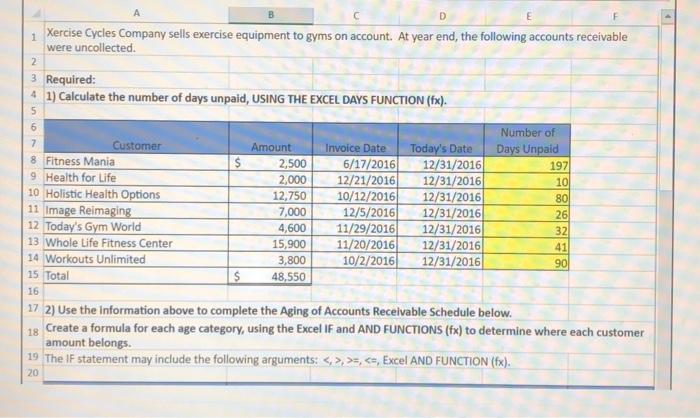
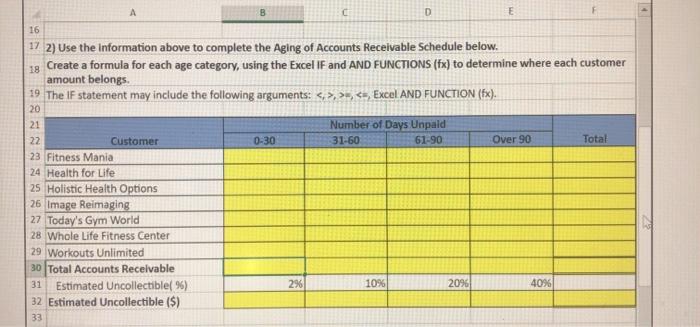
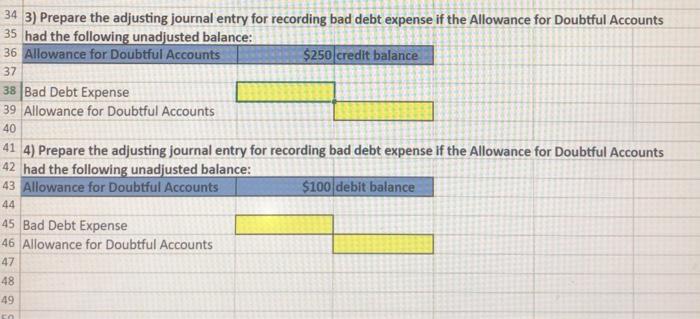
A B C D E 16 18 0-30 Over 90 172) Use the information above to complete the Aging of Accounts Receivable Schedule below. Create a formula for each age category, using the Excel IF and AND FUNCTIONS (fx) to determine where each customer amount belongs. 19 The IF statement may include the following arguments: >>,
Step by Step Solution
There are 3 Steps involved in it
1 Expert Approved Answer
Step: 1 Unlock

Question Has Been Solved by an Expert!
Get step-by-step solutions from verified subject matter experts
Step: 2 Unlock
Step: 3 Unlock
 Study Help