



Question: A B C D F Email First Last # Concatenate 2 pdangelo1@company.ca P dangelo pdangelo1@company.ca 3 dgoggin2@company.ca d goggin dgoggin2@company.ca 4 bluu2@company.ca UU 21 bluu2@company.ca
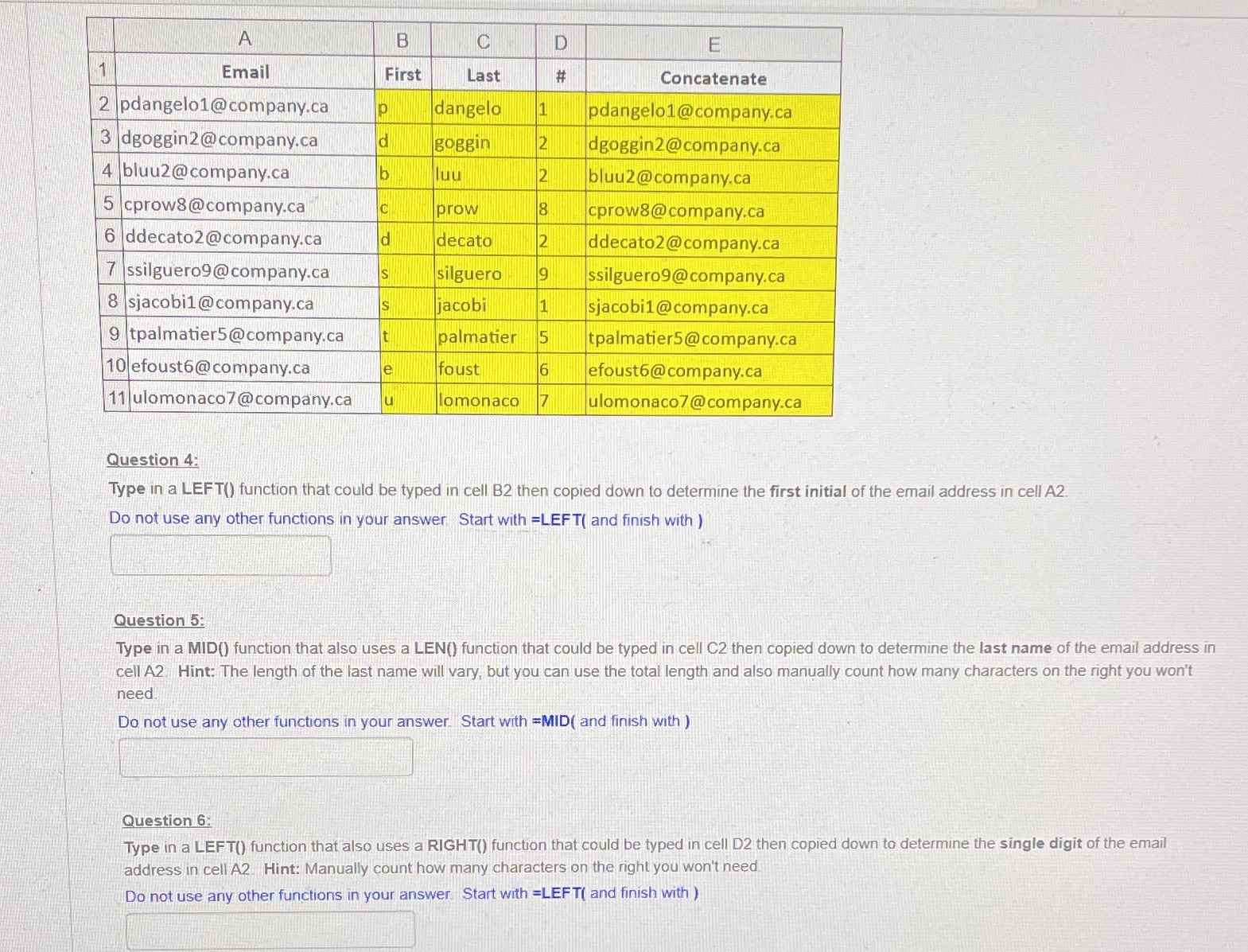
A B C D F Email First Last # Concatenate 2 pdangelo1@company.ca P dangelo pdangelo1@company.ca 3 dgoggin2@company.ca d goggin dgoggin2@company.ca 4 bluu2@company.ca UU 21 bluu2@company.ca 5 cprow8@company.ca prow 8 cprow8@company.ca 6 ddecato2@company.ca decato N ddecato2@company.ca 7 ssilguero9@company.ca silguero 9 ssilguero9@company.ca 8 sjacobi1 @company.ca S jacob 1 sjacobi1@company.ca 9 tpalmatier5@company.ca palmatier 5 tpalmatier5@company.ca 10 efoust6@ company.ca e foust 6 efoust6@company.ca 11 ulomonaco7@company.ca u omonaco Z ulomonaco7 @company.ca Question 4: Type in a LEFT() function that could be typed in cell B2 then copied down to determine the first initial of the email address in cell A2. Do not use any other functions in your answer, Start with =LEFT( and finish with ) Question 5: Type in a MID() function that also uses a LEN() function that could be typed in cell C2 then copied down to determine the last name of the email address in cell A2, Hint: The length of the last name will vary, but you can use the total length and also manually count how many characters on the right you won't need Do not use any other functions in your answer Start with =MID( and finish with ) Question 6: Type in a LEFT() function that also uses a RIGHT() function that could be typed in cell D2 then copied down to determine the single digit of the email address in cell A2. Hint: Manually count how many characters on the right you won't need Do not use any other functions in your answer Start with =LEFT( and finish with )
Step by Step Solution
There are 3 Steps involved in it

Get step-by-step solutions from verified subject matter experts