







Question: A B D E F G 1 Cost Behavior 2 Prepare a contribution margin income statement 3 Five Macaws is a specialty pet gift shop
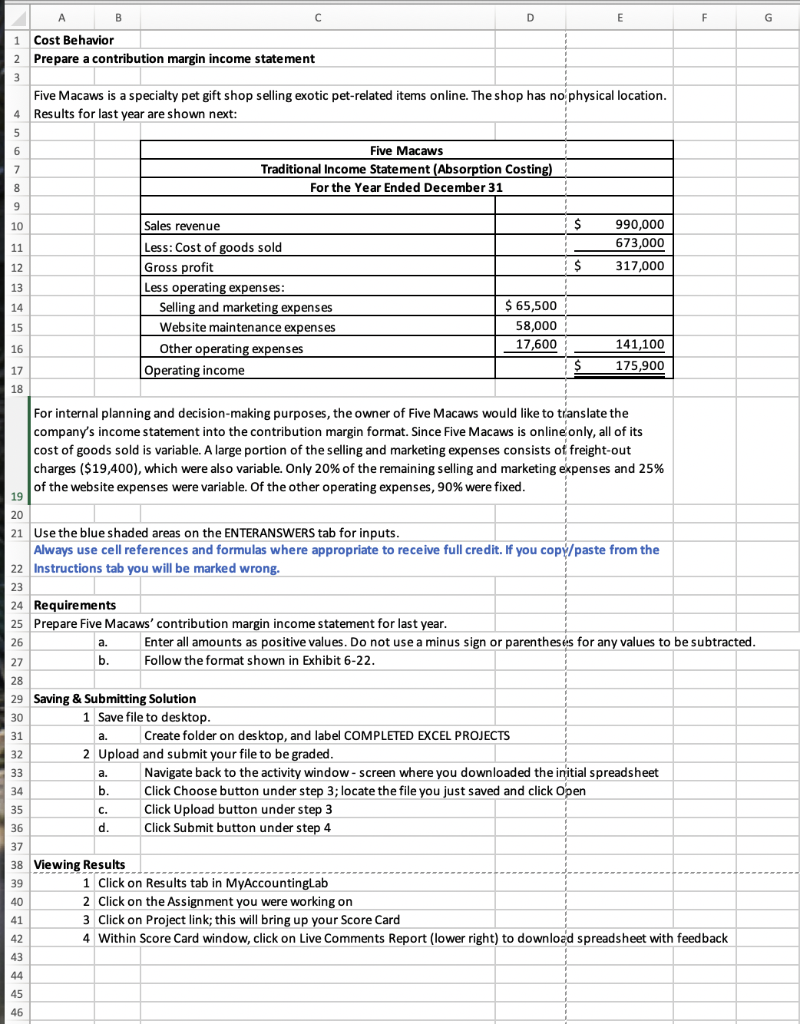
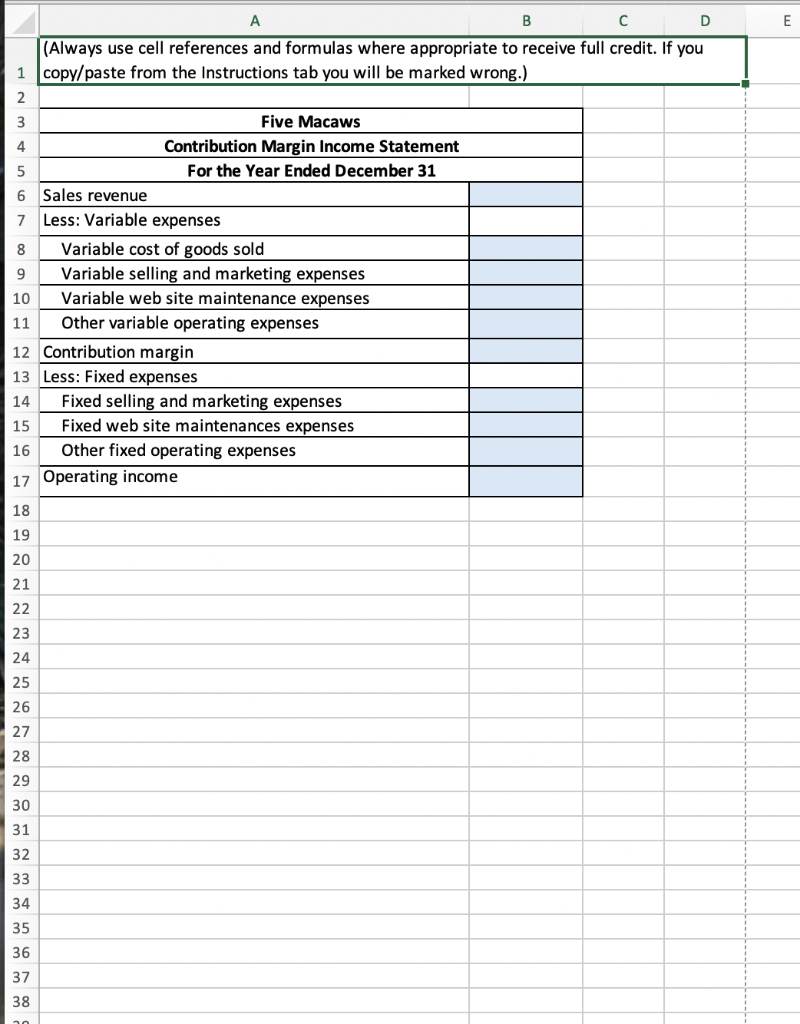
A B D E F G 1 Cost Behavior 2 Prepare a contribution margin income statement 3 Five Macaws is a specialty pet gift shop selling exotic pet-related items online. The shop has no physical location. 4 Results for last year are shown next: 5 Five Macaws 7 Traditional Income Statement (Absorption Costing) 8 For the Year Ended December 31 6 9 10 $ 11 990,000 673,000 317,000 12 $ 13 Sales revenue Less: Cost of goods sold Gross profit Less operating expenses: Selling and marketing expenses Website maintenance expenses Other operating expenses Operating income 14 15 $ 65,500 58,000 17,600 16 141,100 175,900 17 $ 18 For internal planning and decision-making purposes, the owner of Five Macaws would like to translate the company's income statement into the contribution margin format. Since Five Macaws is online only, all of its cost of goods sold is variable. A large portion of the selling and marketing expenses consists of freight-out charges ($19,400), which were also variable. Only 20% of the remaining selling and marketing expenses and 25% of the website expenses were variable. Of the other operating expenses, 90% were fixed. 19 20 21 Use the blue shaded areas on the ENTERANSWERS tab for inputs. Always use cell references and formulas where appropriate to receive full credit. If you copy/paste from the 22 Instructions tab you will be marked wrong. 23 24 Requirements 25 Prepare Five Macaws' contribution margin income statement for last year. 26 a. Enter all amounts as positive values. Do not use a minus sign or parentheses for any values to be subtracted. 27 b. Follow the format shown in Exhibit 6-22. 28 29 Saving & Submitting Solution 30 1 Save file to desktop. 31 a. Create folder on desktop, and label COMPLETED EXCEL PROJECTS 32 2 Upload and submit your file to be graded. 33 a Navigate back to the activity window-screen where you downloaded the initial spreadsheet b. Click Choose button under step 3; locate the file you just saved and click Open 35 Click Upload button under step 3 36 d. Click Submit button under step 4 37 38 Viewing Results 1 Click on Results tab in MyAccountinglab 2 Click on the Assignment you were working on 41 3 Click on Project link; this will bring up your Score Card 42 4 Within Score Card window, click on Live Comments Report (lower right) to download spreadsheet with feedback 43 a. 34 c. *** 39 40 44 45 46 E A B D (Always use cell references and formulas where appropriate to receive full credit. If you 1 copy/paste from the Instructions tab you will be marked wrong.) 2 3 Five Macaws 4 Contribution Margin Income Statement 5 For the Year Ended December 31 6 Sales revenue 7 Less: Variable expenses 8 Variable cost of goods sold 9 Variable selling and marketing expenses 10 Variable web site maintenance expenses 11 Other variable operating expenses 12 Contribution margin 13 Less: Fixed expenses 14 Fixed selling and marketing expenses 15 Fixed web site maintenances expenses 16 Other fixed operating expenses 17 Operating income 18 19 20 21 22 23 24 25 26 27 28 29 30 31 32 33 34 35 36 37 38
Step by Step Solution
There are 3 Steps involved in it

Get step-by-step solutions from verified subject matter experts
 Study Help