







Question: A B D E F G H 1 Problem 9-14 2 3 Elmdale Enterprises is deciding whether to expand its production facilities. Although long-term cash
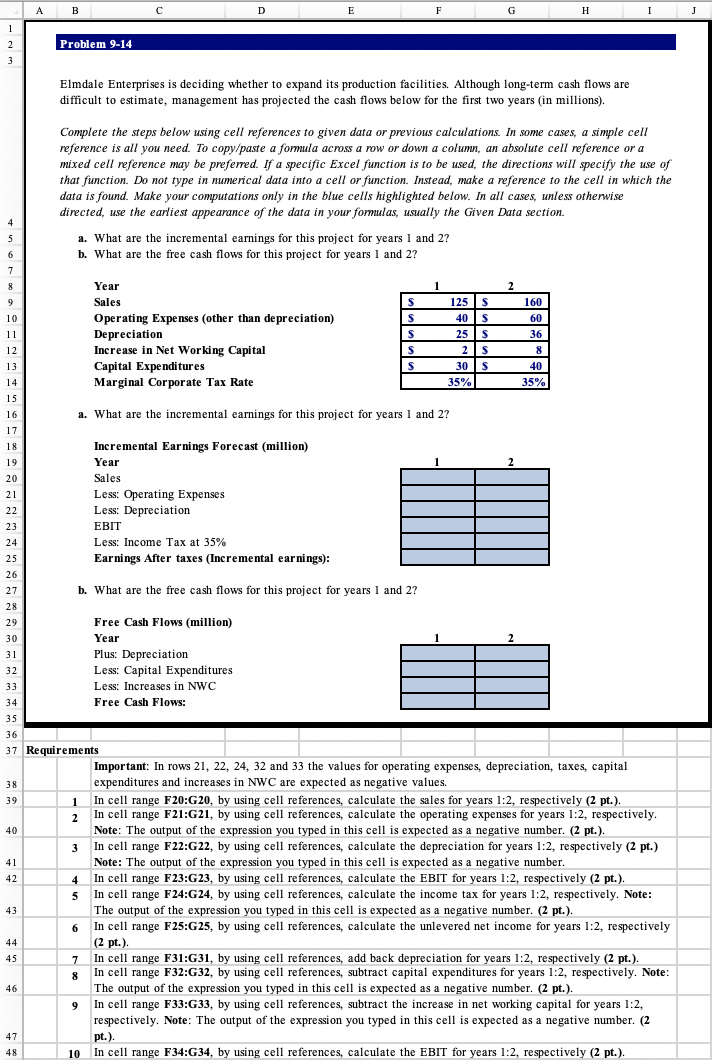
A B D E F G H 1 Problem 9-14 2 3 Elmdale Enterprises is deciding whether to expand its production facilities. Although long-term cash flows are difficult to estimate, management has projected the cash flows below for the first two years (in millions). Complete the steps below using cell references to given data or previous calculations. In some cases, a simple cell reference is all you need. To copy/paste a formula across a row or down a column, an absolute cell reference or a mixed cell reference may be preferred. If a specific Excel function is to be used, the directions will specify the use of that function. Do not type in numerical data into a cell or function. Instead, make a reference to the cell in which the data is found. Make your computations only in the blue cells highlighted below. In all cases, unless otherwise directed, use the earliest appearance of the data in your formulas, usually the Given Data section. a. What are the incremental earnings for this project for years 1 and 2? b. What are the free cash flows for this project for years 1 and 2? 4 5 6 7 1 2 8 9 S 160 60 S Year Sales Operating Expenses (other than depreciation) Depreciation Increase in Net Working Capital Capital Expenditures Marginal Corporate Tax Rate s S S 125s 40 s 25 s 21s 30 S 35% 36 8 40 10 11 12 13 14 15 16 17 18 19 35% a. What are the incremental earnings for this project for years 1 and 2? Incremental Earnings Forecast (million) Year 2 Sales 20 21 22 . 23 . 24 Less: Operating Expenses Less: Depreciation EBIT Less: Income Tax at 35% Earnings After taxes (Incremental earnings): 25 26 27 b. What are the free cash flows for this project for years 1 and 2? 28 2 29 . 30 31 32 Free Cash Flows (million) Year Plus: Depreciation Less: Capital Expenditures Less: Increases in NWC Free Cash Flows: : 33 34 35 36 38 39 1 2 40 3 41 42 5 37 Requirements Important: In rows 21, 22, 24, 32 and 33 the values for operating expenses, depreciation, taxes, capital expenditures and increases in NWC are expected as negative values. In cell range F20:G20, by using cell references, calculate the sales for years 1:2, respectively (2 pt.). In cell range F21:21, by using cell references, calculate the operating expenses for years 1:2, respectively. Note: The output of the expression you typed in this cell is expected as a negative number. (2 pt.). In cell range F22:G22, by using cell references, calculate the depreciation for years 1:2, respectively (2 pt.) Note: The output of the expression you typed in this cell is expected as a negative number. 4. In cell range F23:G23, by using cell references, calculate the EBIT for years 1:2, respectively (2 pt.). In cell range F24:G24, by using cell references, calculate the income tax for years 1:2, respectively. Note: The output of the expression you typed in this cell is expected as a negative number. (2 pt.). 6 In cell range F25:25, by using cell references, calculate the unlevered net income for years 1:2, respectively (2 pt.). In cell range F31:G31, by using cell references, add back depreciation for years 1:2, respectively (2 pt.). In cell range F32:G32, by using cell references, subtract capital expenditures for years 1:2, respectively. Note: The output of the expression you typed in this cell is expected as a negative number. (2 pt.). In cell range F33:G33, by using cell references, subtract the increase in net working capital for years 1:2, respectively. Note: The output of the expression you typed in this cell is expected as a negative number. (2 pt.). In cell range F34:G34, by using cell references, calculate the EBIT for years 1:2, respectively (2 pt.). 43 44 45 7 8 46 9 47 48 10 A B D E F G H 1 Problem 9-14 2 3 Elmdale Enterprises is deciding whether to expand its production facilities. Although long-term cash flows are difficult to estimate, management has projected the cash flows below for the first two years (in millions). Complete the steps below using cell references to given data or previous calculations. In some cases, a simple cell reference is all you need. To copy/paste a formula across a row or down a column, an absolute cell reference or a mixed cell reference may be preferred. If a specific Excel function is to be used, the directions will specify the use of that function. Do not type in numerical data into a cell or function. Instead, make a reference to the cell in which the data is found. Make your computations only in the blue cells highlighted below. In all cases, unless otherwise directed, use the earliest appearance of the data in your formulas, usually the Given Data section. a. What are the incremental earnings for this project for years 1 and 2? b. What are the free cash flows for this project for years 1 and 2? 4 5 6 7 1 2 8 9 S 160 60 S Year Sales Operating Expenses (other than depreciation) Depreciation Increase in Net Working Capital Capital Expenditures Marginal Corporate Tax Rate s S S 125s 40 s 25 s 21s 30 S 35% 36 8 40 10 11 12 13 14 15 16 17 18 19 35% a. What are the incremental earnings for this project for years 1 and 2? Incremental Earnings Forecast (million) Year 2 Sales 20 21 22 . 23 . 24 Less: Operating Expenses Less: Depreciation EBIT Less: Income Tax at 35% Earnings After taxes (Incremental earnings): 25 26 27 b. What are the free cash flows for this project for years 1 and 2? 28 2 29 . 30 31 32 Free Cash Flows (million) Year Plus: Depreciation Less: Capital Expenditures Less: Increases in NWC Free Cash Flows: : 33 34 35 36 38 39 1 2 40 3 41 42 5 37 Requirements Important: In rows 21, 22, 24, 32 and 33 the values for operating expenses, depreciation, taxes, capital expenditures and increases in NWC are expected as negative values. In cell range F20:G20, by using cell references, calculate the sales for years 1:2, respectively (2 pt.). In cell range F21:21, by using cell references, calculate the operating expenses for years 1:2, respectively. Note: The output of the expression you typed in this cell is expected as a negative number. (2 pt.). In cell range F22:G22, by using cell references, calculate the depreciation for years 1:2, respectively (2 pt.) Note: The output of the expression you typed in this cell is expected as a negative number. 4. In cell range F23:G23, by using cell references, calculate the EBIT for years 1:2, respectively (2 pt.). In cell range F24:G24, by using cell references, calculate the income tax for years 1:2, respectively. Note: The output of the expression you typed in this cell is expected as a negative number. (2 pt.). 6 In cell range F25:25, by using cell references, calculate the unlevered net income for years 1:2, respectively (2 pt.). In cell range F31:G31, by using cell references, add back depreciation for years 1:2, respectively (2 pt.). In cell range F32:G32, by using cell references, subtract capital expenditures for years 1:2, respectively. Note: The output of the expression you typed in this cell is expected as a negative number. (2 pt.). In cell range F33:G33, by using cell references, subtract the increase in net working capital for years 1:2, respectively. Note: The output of the expression you typed in this cell is expected as a negative number. (2 pt.). In cell range F34:G34, by using cell references, calculate the EBIT for years 1:2, respectively (2 pt.). 43 44 45 7 8 46 9 47 48 10
Step by Step Solution
There are 3 Steps involved in it

Get step-by-step solutions from verified subject matter experts
 Study Help