







Question: A B D E F G H J K L M N O Q F Donations Leads per Call Donations per Call 18 Phone Calls
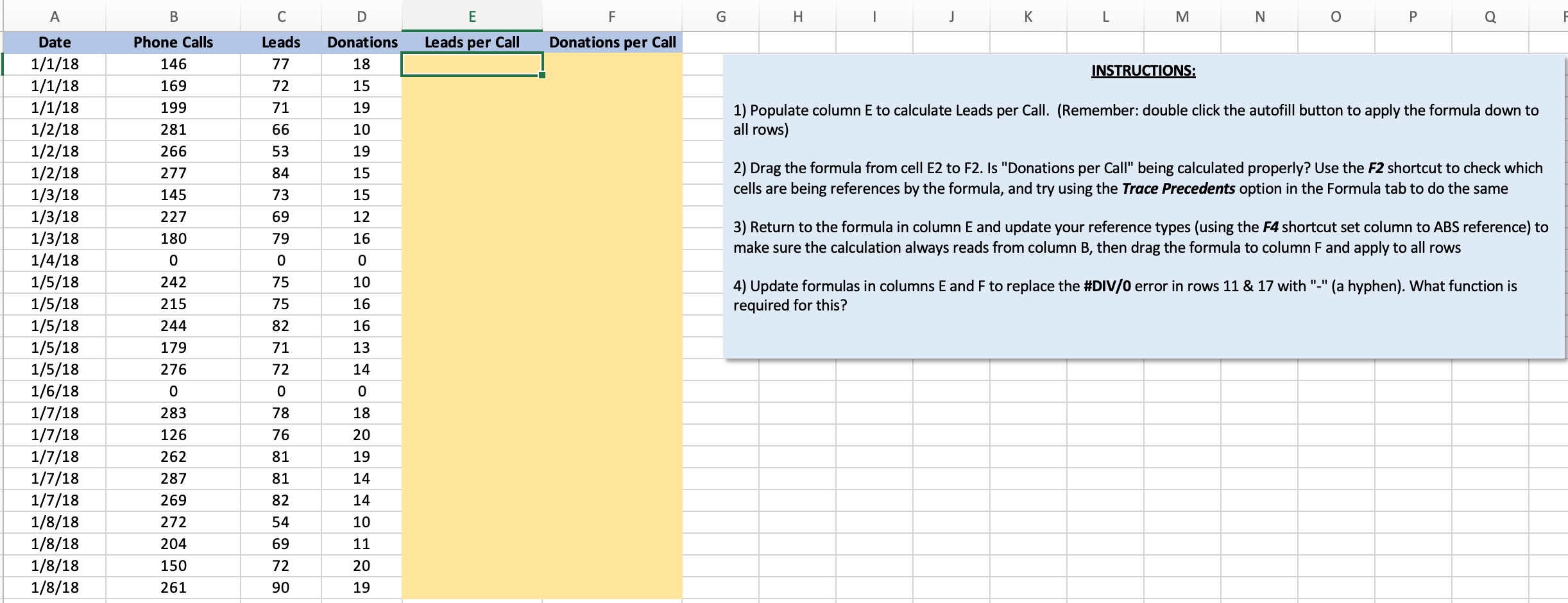
A B D E F G H J K L M N O Q F Donations Leads per Call Donations per Call 18 Phone Calls 146 169 199 INSTRUCTIONS: 15 Leads 77 72 71 66 53 84 19 10 1) Populate column E to calculate Leads per Call. (Remember: double click the autofill button to apply the formula down to all rows) 281 19 266 277 15 2) Drag the formula from cell E2 to F2. Is "Donations per Call" being calculated properly? Use the F2 shortcut to check which cells are being references by the formula, and try using the Trace Precedents option in the Formula tab to do the same 145 227 180 73 69 79 15 12 16 0 10 16 3) Return to the formula in column E and update your reference types (using the F4 shortcut set column to ABS reference) to make sure the calculation always reads from column B, then drag the formula to column F and apply to all rows 0 0 75 242 215 244 4) Update formulas in columns E and F to replace the #DIV/0 error in rows 11 & 17 with "-" (a hyphen). What function is required for this? Date 1/1/18 1/1/18 1/1/18 1/2/18 1/2/18 1/2/18 1/3/18 1/3/18 1/3/18 1/4/18 1/5/18 1/5/18 1/5/18 1/5/18 1/5/18 1/6/18 1/7/18 1/7/18 1/7/18 1/7/18 1/7/18 1/8/18 1/8/18 1/8/18 1/8/18 75 82 71 72 16 13 179 276 14 0 0 0 283 18 20 126 262 78 76 81 81 19 287 14 14 10 269 272 204 150 261 82 54 69 72 11 20 90 19
Step by Step Solution
There are 3 Steps involved in it

Get step-by-step solutions from verified subject matter experts
 Study Help