







Question: a. b. In cell B17, enter a formula using the CUMPRINC function to calculate the cumulative principal paid for Year 1 (payment 1 in cell
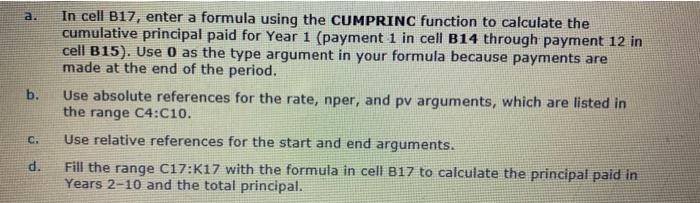
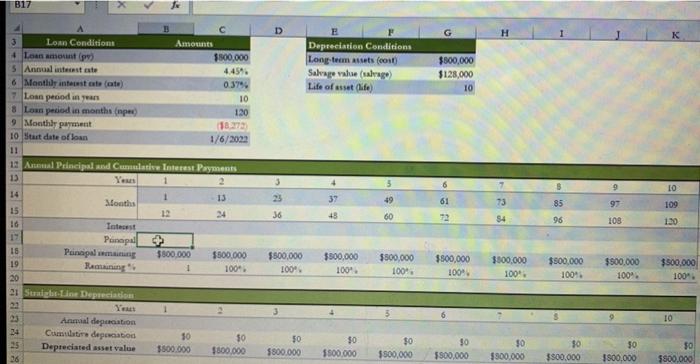
a. b. In cell B17, enter a formula using the CUMPRINC function to calculate the cumulative principal paid for Year 1 (payment 1 in cell B14 through payment 12 in cell B15). Use O as the type argument in your formula because payments are made at the end of the period. Use absolute references for the rate, nper, and pv arguments, which are listed in the range C4:C10. Use relative references for the start and end arguments. Fill the range C17:K17 with the formula in cell B17 to calculate the principal paid in Years 2-10 and the total principal. C. d. B17 H Depreciation Conditions Long-term uses (010 Salvage value (abrego Life of the $800,000 $128,000 10 3 Loan Conditions Amounts 4 Loan amont (9) $500,000 5 Annual interest este 4459 6 Monthly intestate (ote) 0.375 7 Loan period in un 10 8 Lun pecod in months per 120 9 Monthly payment (182273 10 Start date of loan 1/6/2002 11 12 And Principal and Cumulative Interest Payments 13 2 14 1 13 Sonths 15 12 16 Totest Punapa 16 Pointipal mining $800,000 $500.000 19 Remainings 100. 20 21 Sunshine Depreciation 9 49 LO 109 61 37 43 85 97 73 54 36 60 96 108 130 $300,000 $500,000 100 100% $800,000 100. $500,000 1009 3800,000 100". $500,000 100. $500,000 100". $500,000 100. 10 Anual deparation Cumultideportid Depreciated asset value 10 3500.000 $0 $300.000 $0 $800,000 $0 $500.000 $0 $500,000 30 $800,000 30 $300,000 $0 $800.000 30 3800,000 50 $800,000 36
Step by Step Solution
There are 3 Steps involved in it

Get step-by-step solutions from verified subject matter experts
 Study Help