





Question: a. C. d. e. 10. Min Jee wants to combine the sales data from each of the art fairs. Switch to the Combined Sales worksheet,
a. C. d. e. 10. Min Jee wants to combine the
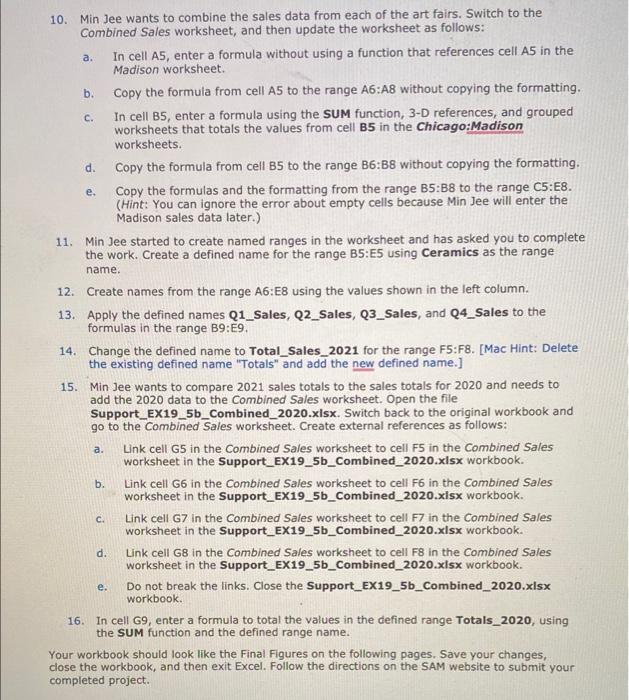
a. C. d. e. 10. Min Jee wants to combine the sales data from each of the art fairs. Switch to the Combined Sales worksheet, and then update the worksheet as follows: In cell A5, enter a formula without using a function that references cell A5 in the Madison worksheet. b. Copy the formula from cell A5 to the range A6:A8 without copying the formatting. In cell B5, enter a formula using the SUM function, 3-D references, and grouped worksheets that totals the values from cell B5 in the Chicago:Madison worksheets. Copy the formula from cell B5 to the range B6:38 without copying the formatting. Copy the formulas and the formatting from the range B5:38 to the range C5:E8. (Hint: You can ignore the error about empty cells because Min Jee will enter the Madison sales data later.) 11. Min Jee started to create named ranges in the worksheet and has asked you to complete the work. Create a defined name for the range B5:E5 using Ceramics as the range name. 12. Create names from the range A6:E8 using the values shown in the left column. 13. Apply the defined names Q1_Sales, Q2_Sales, Q3_Sales, and Q4_Sales to the formulas in the range B9:E9. 14. Change the defined name to Total_Sales_2021 for the range F5:58. [Mac Hint: Delete the existing defined name "Totals" and add the new defined name.] 15. Min Jee wants to compare 2021 sales totals to the sales totals for 2020 and needs to add the 2020 data to the combined Sales worksheet. Open the file Support_EX19_5b_Combined_2020.xlsx. Switch back to the original workbook and go to the combined Sales worksheet. Create external references as follows: Link cell G5 in the Combined Sales worksheet to cell F5 in the Combined Sales worksheet in the Support_EX19_5b_Combined_2020.xlsx workbook. b. Link cell G6 in the Combined Sales worksheet to cell F6 in the Combined Sales worksheet in the Support_EX19_5b_Combined_2020.xlsx workbook. Link cell G7 in the combined Sales worksheet to cell F7 in the combined Sales worksheet in the Support_EX19_5b_Combined_2020.xlsx workbook. Link cell G8 in the combined Sales worksheet to cell F8 in the combined Sales worksheet in the Support_EX19_5b_Combined_2020.xlsx workbook. Do not break the links. Close the Support_EX19_5b_Combined_2020.xlsx workbook. 16. In cell G9, enter a formula to total the values in the defined range Totals_2020, using the SUM function and the defined range name. Your workbook should look like the Final Figures on the following pages. Save your changes, close the workbook, and then exit Excel. Follow the directions on the SAM website to submit your completed project. a. c. d. e

Step by Step Solution

There are 3 Steps involved in it

1 Expert Approved Answer
Step: 1 Unlock blur-text-image

Question Has Been Solved by an Expert!

Get step-by-step solutions from verified subject matter experts

Step: 2 Unlock
Step: 3 Unlock

Students Have Also Explored These Related General Management Questions!