







Question: A. Create two classes according to the given UML diagram Employee -name: String -heir Date: Date - salary: double +Employee(String, Date, double) getName(): String +getHeirDate():
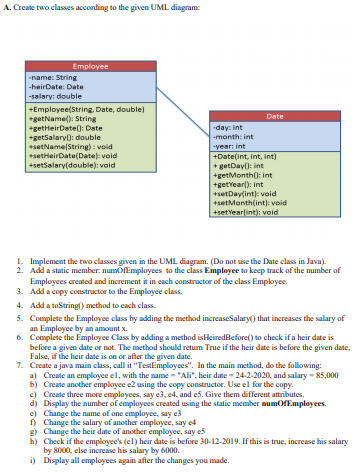
A. Create two classes according to the given UML diagram Employee -name: String -heir Date: Date - salary: double +Employee(String, Date, double) getName(): String +getHeirDate(): Date +getSalary: double setNameString): void setHeirate(Data)void +setsalary(double):void Date -day:int -month: int -Year: int +Date(int, int, int) + getDay:int +get Month: int +getYeart); int +set Daylint void +set Month(int). void +setYear(int): void 1. Implement the two classes given in the UML diagram. (Do not use the Date class in Java). 2. Add a static member numbfEmployees to the class Employee to keep track of the number of Employees created and increment it in each constructor of the class Employee. 3. Add a copy constructor to the Employee class. 4. Add a toString() method to each class. 5. Complete the Employee class by adding the method increaseSalary) that increases the salary of an Employee by an amount 6. Complete the Employee Class by adding a method is Heired Before to check if a heir date is before a given date or not. The method should retum True if the heir date is before the given date, False, if the heir date is on or after the given date. 7. Create a java main class, call it "TestEmployees". In the main method, do the following: a) Create an employee el, with the name "Ali", heir date - 24-2-2020, and salary - 25,000 b) Create another employee e2 using the copy constructor. Use el for the copy. c) Create three more employees, say e3, 4, and e. Give them different attributes. d) Display the number of employees created using the static member mumOfEmployees e) Change the name of one employee, say e3 f) Change the salary of another employee, say g) Change the heir date of another employee, say es h) Check if the employees (el) heir date is before 30-12-2019. If this is true, increase his salary by 8000, clse increase his salary by 6000 i) Display all employees again after the changes you made
Step by Step Solution
There are 3 Steps involved in it

Get step-by-step solutions from verified subject matter experts
 Study Help