







Question: A form is designed, as attached, to perform a calculation on some instalment for the amount to be borrowed. Using VS2019 student edition write a
A form is designed, as attached, to perform a calculation on some instalment for the amount to be borrowed. Using VS2019 student edition write a VB program in accordance. Use the following instructions.
1. Fill in the Textboxes provided in accordance with the data types introduced.
2. Use "Calculate" button to calculate the instalment for the given "Duration"
3. Place the instalment in the Listbox provided.
4. Having in mind that this process is to be repeated for number of different people, calculate the total instalments and place the total in the bottom Textbox.
5. Create a RAR file of your project and send it thru UZEM by 8th of January.
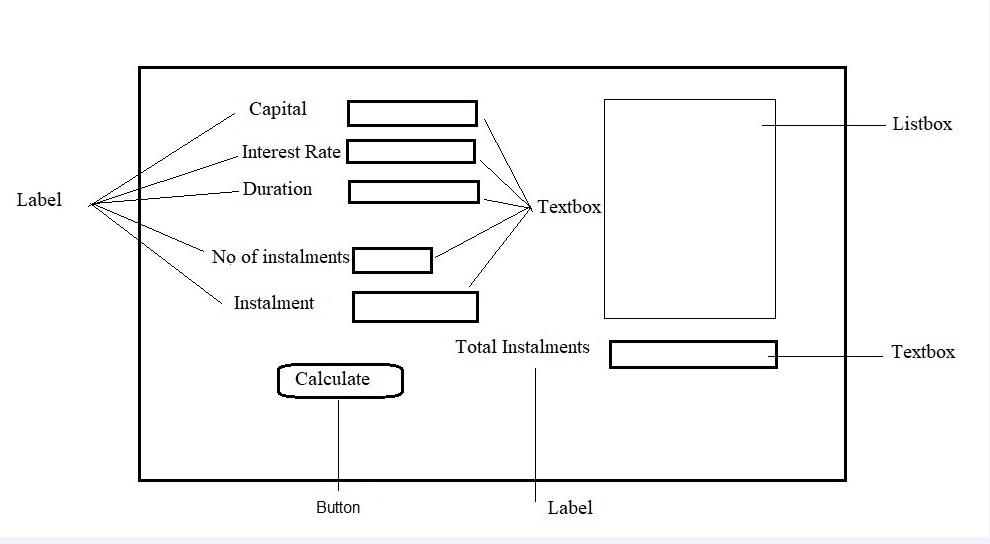
Capital Listbox Interest Rate Duration Label Textbox No of instalments Instalment Total Instalments Textbox Calculate Button Label
Step by Step Solution
There are 3 Steps involved in it

Get step-by-step solutions from verified subject matter experts
 Study Help