







Question: A Java program for a Demand Paging Simulator according to the following rules. The program will implement two Demand Paging algorithms: the classical OPT algorithm
A Java program for a Demand Paging Simulator according to the following rules. The program will implement two Demand Paging algorithms: the classical OPT algorithm and a NEW algorithm, described below.
The application must simulate the execution the OPT and NEW algorithms on a hypothetical computer having only N physical frames (numbered from 0 to N-1; the maximum value for the parameter N is 8), assuming that the single process that is running has a virtual memory of ten pages (numbered from 0 to 9). The number N should be a number provided as an input for the algorithms, using the program menu.
The user should be able to run the OPT algorithm (for example) using the same reference string for a scenario where N is 4, then change N to 5 and run again, then change N to 6 and run again and in the end compare the results for each scenario. In other words, the number of physical frames should not be fixed (hardcoded) in the program, but rather considered as an input variable (parameter) for the implemented algorithms.
The program must have a text menu like this:
0 - Exit
1 - Input N
2 - Input the reference string
3 - Simulate the OPT algorithm
4 - Simulate the NEW algorithm Select option:
The menu is displayed and the user must select an option (a number between 0 and 4). The action corresponding to the selection is performed, then the menu is displayed again and the user can choose another option. This cycle is repeated until the user selects 0, which exits the loop and ends the program execution.
The options are:
0-Exit
This options ends the program execution. This option should always work.
1-InputN
The user is prompted for a [positive integer] number N. This is normally one of the first options that must be selected by the user. The number N must be at least 2 (otherwise the algorithms don't make any sense) but should not be larger than 8; the program must verify these constraints and issue an error message whenever necessary.
After performing several operations from the menu, the user should be able to select another N and work with the new N just as easily as before.
2 - Input the reference string
The user is prompted for a series of [positive integer] numbers that will constitute the reference string. The maximum length of the reference string should be 20. This is normally one of the first options that must be selected by the user. The number of elements in the reference string must be at least N (otherwise the algorithms don't make any sense) but should not be larger than 20; each element of the reference string must be an integer number between 0 and 9 (there are 10 virtual pages). The program must verify these constraints and issue an error message whenever necessary.
After performing several operations from the menu, the user should be able to select another reference string and work with the new reference string just as easily as before.
3 - Simulate the OPT algorithm
This option must first verify that a correct N and a correct reference string were already provided by the user; otherwise an error message should be issued and the program returns to the menu.
If all the input data (N and the reference string) is available and correct, the simulation begins by printing the initial (empty) simulation table, for example:
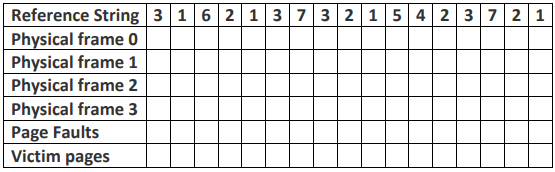
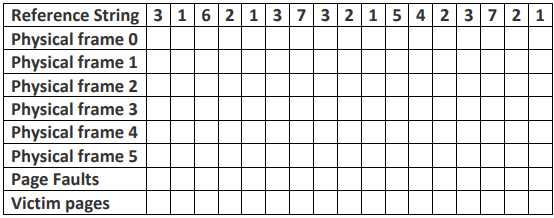
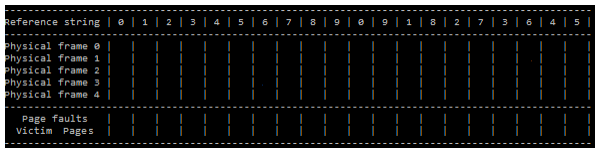
Reference String 3 1 6 213732 1 5 4 2 3721 Physical frame 0 Physical frame 1 Physical frame 2 Physical frame 3 Page Faults Victim pagesReference String 3 1 6 21373 2 1 5 423721 Physical frame 0 Physical frame 1 Physical frame 2 Physical frame 3 Physical frame 4 Physical frame 5 Page Faults Victim pagesReference string | 1 5 6 7 9 9 1 6 5 Physical frame @ Physical frame 1 Physical frame 2 Physical frame Physical frame 4 Page faults Victim Pages
Step by Step Solution
There are 3 Steps involved in it

Get step-by-step solutions from verified subject matter experts
 Study Help