







Question: A Movie Stunt Simulation with Graphical User Interface In the 1994 action-adventure film Speed, a Los Angeles bus with a bomb that was set to
A Movie Stunt Simulation with Graphical User Interface
In the 1994 action-adventure film Speed, a Los Angeles bus with a bomb that was set to explode if the speed of the buss fell below 50 mph (22 m/s). The police discovered the bomb and routed the buss on to a segment of freeway that was still under construction. In a twist of the plot, they overlooked a 50-foot (15 m) horizontal gap in the construction. Since the bomb would explode and kill everyone on board if they slowed down, the bus must jump the gap.
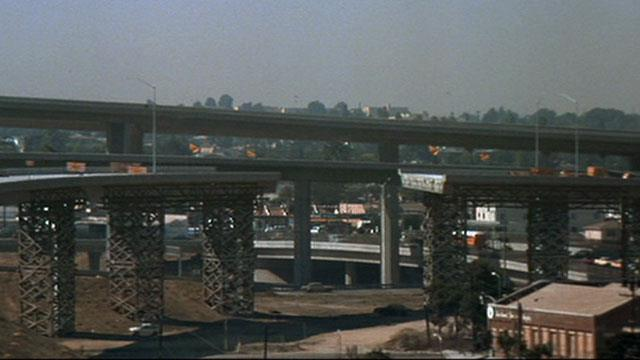
Write a MATLAB Graphical User Interface (GUI) program to simulate and animate this movie stunt for the movie crew and compute if the actors and the bus can survive the jump at different freeway incline angles and bus speeds.
Show 2 pictures in GUI when the program starts.
Show the plot of the freeway and the gap when the program starts.
? Draw 20 meters of the horizontal freeway before the jump off point in the plot.
? The freeway is 50 feet (15 m) above the ground at the jump off point.
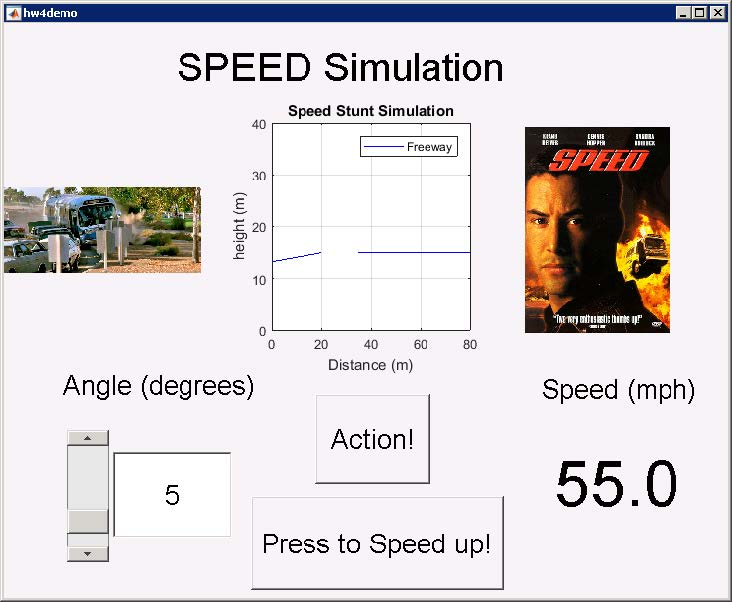
? Decide an initial value of the freeway incline angle, compute and draw the incline of the freeway in the plot. If the angel is initialized to 0, draw a 20-meter horizontal line.
? Draw another 45 meters of freeway after the 15-meter horizontal gap in the plot.
? Adjust the axis to plot the simulation 80 meters wide and 40 meters tall.
? Add plot title, and label x-axis and y-axis.
Provide the movie crew a slider bar and an edit text box to adjust the freeway incline angle in GUI. Add a static text box to indicate the value is for the freeway incline angle in degrees.
? Configure the sliderbar to slide between 0 and 30 degrees in GUI.
? Initialize the slider bar and edit text box to show 0 degrees.
? Allow the movie crew to adjust the slider position to change angle. Show the angle value set by the slider bar in the edit text box.
? Let the movie crew modify the freeway incline angle from the edit text box as well.
? The value input in the edit text box should move the slider position.
? The slider bar can disappear if the edit text box contains a value above 30.
? Whenever the slider bar or the edit text box changes value, compute and update the freeway plot to show the freeway incline angle.
Build a button and a static text box to simulate the gas paddle and speedometerfor the movie crew. Add another text box to indicate that the speedometer value is the speed in mph.
? Show the bus speed in miles per hour (mph).
? Initialize the static text box to show 55 mph.
? The movie crew can click the gas button to increase the bus speed by a bit. For example, each click can increase the speed by 0.5 mph.
? Update the bus speed shown in the speedometer for each button click.
Build an action button in GUI for the movie crew to start the bus path animation in slow motion.
? Display the two initial pictures in GUI.
? Initialize the bus speed to 55 mph and update the speedometer.
? Prepare the freeway coordinates after the 15-meter gap.
? Obtain the current bus speed from the text box in GUI.
? Obtain the current freeway incline angle from the edit text box in GUI.
? Compute the freeway coordinates before the 15-meter gap based on the freeway incline angle.
? Obtain the bus coordinates from the freeway coordinates before the 15-meter gap, by adding 1 meter to the freeways y direction coordinates.
? Animate the bus movement before jump by adding a loop to plot one point of the bus x-y coordinate at a time. Move the code that will obtain the current bus speed and freeway incline angle from GUI inside the loop to compute and plot the most current values. Include the plot background, such as the freeway, the plot title, label, legend, and axis setting in the loop. Add a small pause in the loop, for example 0.1 second, to give the movie crew time to speed up the bus before jump.
? After the bus is in the air, modifying the bus speed should no longer change the simulation outcome.
? Compute the bus projectile motion. Ignore air resistance in the calculation.
o Convert the bus speed from miles per hour (MPH) to meters per second (m/s). Recall that 1 mph = 0.44704 m/s.
o Based on the freeway incline angle, compute the initial speed of the bus in the x and y directions.
o Compute the time it takes for the bus to reach the maximum height (vy0 = 0) using vy = vy0 + ay t.
o Compute the maximum height of the bus using y = y0 + vy0t + ay t 2 .
o Compute the time it takes for the bus to free fall (vy0 = 0) from its maximum height to the ground using y = y0 + vy0t + ay t 2 .
o Sum the time that the bus is going up and going down together to obtain the total time the bus will be in the air if it will not land on the freeway. o Use the MATLAB linspace function to generate a large array of time that starts at 0 and ends at the total time with 100 equally spaced time points.
o Compute an array of x and an array of y values from each time point in the large time array using x = x0 + vx0t + ax t 2 and y = y0 + vy0t + ay t 2 .
o Try different initial velocities and angles, plot, and confirm results with an online projectile motion calculator. For example: http://www.convertalot.com/ballistic_trajectory_calculator.html
o Use the MATLAB find function to find the index numbers of all the values in the array of the bus y-coordinates projectile motion that are larger than or equal to 15 meters. Save the index numbers in a new variable.
o Create a new bus projectile motion x coordinates from the old bus x coordinates that only contain the new index numbers.
o Create a new bus projectile motion y coordinates from the old bus y coordinates that only contain the new index numbers
? Animate the bus jump in slow motion.
If the length of the new bus projectile motion x coordinates is larger than 0 AND the last value of the new bus projectile motion x coordinate is larger than or equal to 35:
? The bus will land on the freeway. We will obtain the bus coordinates after landing with the next few steps.
? Use the MATLAB find function to find the index numbers of all the values in the x-coordinates of the freeway after the 15-meter gap that are larger than or equal to the last value in the new bus projectile motion x coordinates array. Save the index numbers in a new variable.
? Apply the index numbers to the x-coordinates of the freeway after the 15- meter gap to obtain the bus x-coordinates after landing.
? Apply the index numbers to (the y-coordinates of the freeway after the 15- meter gap+1) to obtain the bus y-coordinates after landing.
? Combine the new bus projectile motion x coordinates and the bus xcoordinates after landing to form the bus jump path for the x direction.
? Combine the new bus projectile motion y coordinates and the bus ycoordinates after landing to form the bus jump path for the y direction.
? Add a loop to plot one point of the bus jump path x-y coordinate at a time. Include the plot background, such as the freeway, the plot title, label, legend, and axis setting in the loop. Add a small pause in the loop, for example 0.1 second, to animate the bus jump.
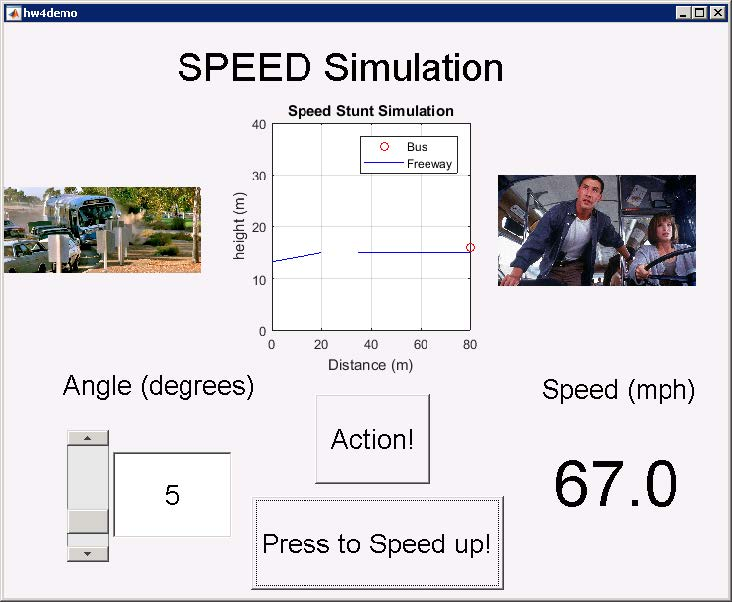
? Update one picture to indicate a successful result for the movie crew.
o Else:
? The bus will crash.
? The bus jump path x-direction coordinates are the old bus projectile x coordinates.
? The bus jump path y-direction coordinates are the (old bus projectile y coordinates+1).
? Add a loop to plot one point of the bus jump path x-y coordinate at a time. Include the plot background, such as the freeway, the plot title, label, legend, and axis setting in the loop. Add a small pause in the loop, for example 0.1 second, to animate the bus jump.
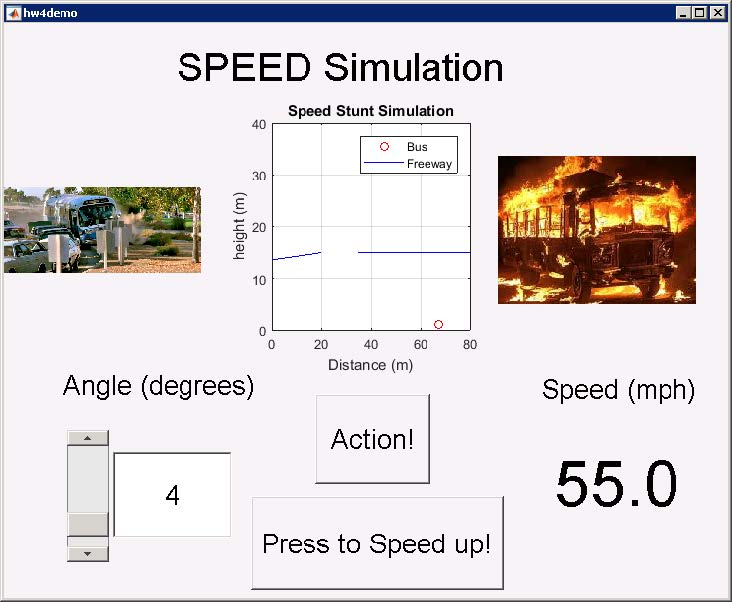
? Update one picture to indicate a crash for the movie crew.
(Here is an example components and display when the program starts.)
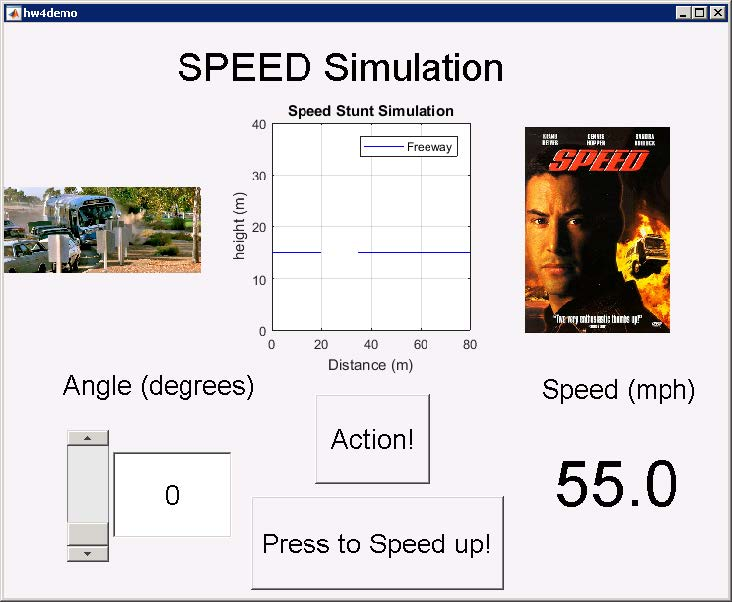 (Here is an example components and display after adjusting the Angle.)
 (Here is an example components and display after pressing the Action button.)
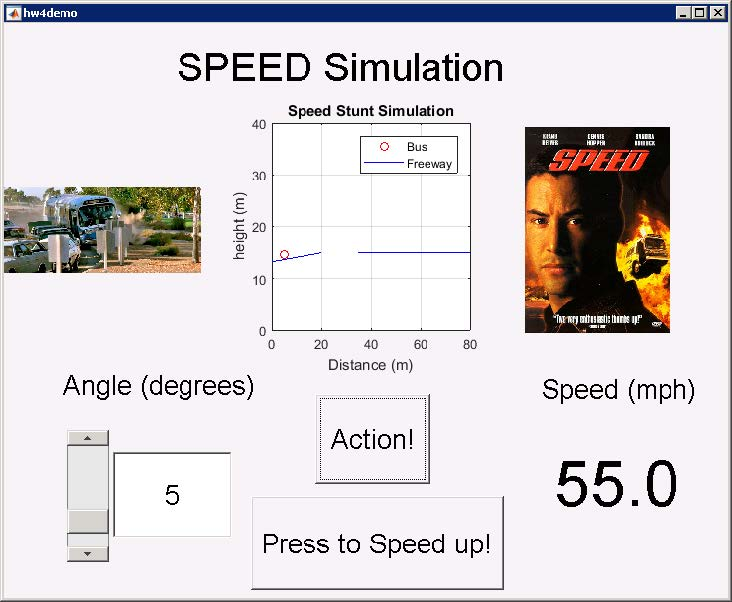
Here is an example components and display after pressing the Press to Speed up! Button rapidly before the bus reaches the gap.)
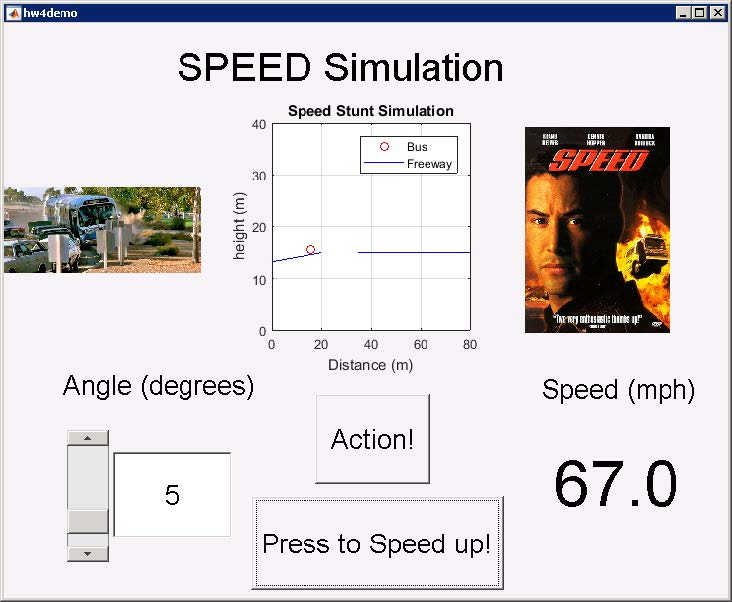 (Here is an example components and display for a safe simulation result.)
 (Here is an example components and display if the simulation ends in a crash.) Ensure your
Step by Step Solution
There are 3 Steps involved in it

Get step-by-step solutions from verified subject matter experts
 Study Help