







Question: A sample input file courses.csv is given. A back up file ( coursesBackup . csv ) for this sample is also given. The content of
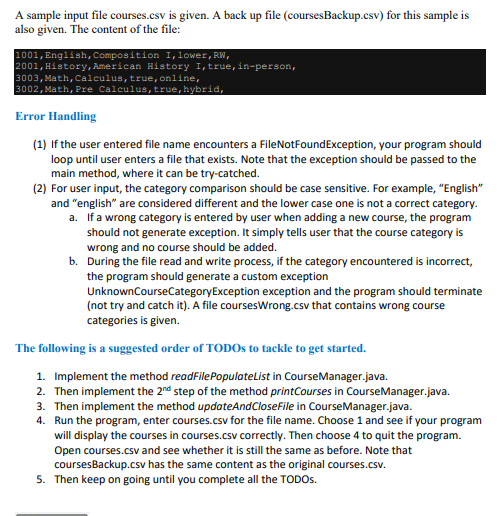
A sample input file courses.csv is given. A back up file coursesBackupcsv for this sample is also given. The content of the file:
Engish, Composition I, lower, RN
History,American History I,true,inperson,
Math, Calculus, true, online,
Math, Pre Calculus, true, hybrid,
Error Handling
If the user entered file name encounters a FileNotFoundException, your program should loop until user enters a file that exists. Note that the exception should be passed to the main method, where it can be trycatched.
For user input, the category comparison should be case sensitive For example, "English" and "english" are considered different and the lower case one is not a correct category.
a If a wrong category is entered by user when adding a new course, the program should not generate exception. It simply tells user that the course category is wrong and no course should be added.
b During the file read and write process, if the category encountered is incorrect, the program should generate a custom exception
UnknownCourseCategoryException exception and the program should terminate not try and catch it A file coursesWrong.csv that contains wrong course categories is given.
The following is a suggested order of TODOs to tackle to get started.
Implement the method readFilePopulateList in CourseManager.java.
Then implement the text nd step of the method printCourses in CourseManager.java.
Then implement the method updateAndCloseFile in CourseManager.java.
Run the program, enter courses.csv for the file name. Choose and see if your program will display the courses in courses.csv correctly. Then choose to quit the program.
Open courses.csv and see whether it is still the same as before. Note that coursesBackup.csv has the same content as the original courses.csv
Then keep on going until you complete all the TODOs.
Step by Step Solution
There are 3 Steps involved in it
1 Expert Approved Answer
Step: 1 Unlock

Question Has Been Solved by an Expert!
Get step-by-step solutions from verified subject matter experts
Step: 2 Unlock
Step: 3 Unlock
 Study Help