







Question: A satellite single-axis attitude control system can be represented by the block diagram above. Controller Spacecraft k(s+a) s+b 0(s) Desired attitude 8(3) Actual attitude
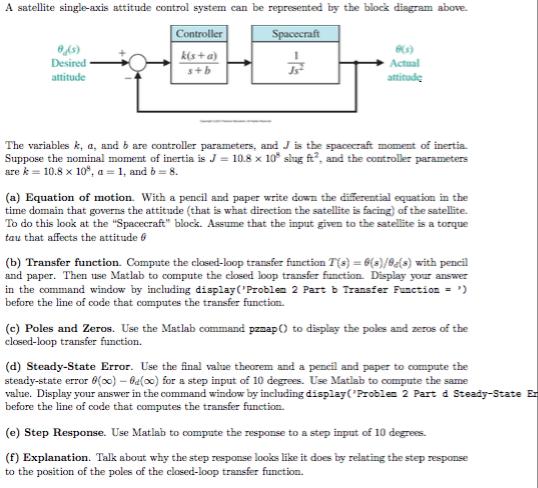
A satellite single-axis attitude control system can be represented by the block diagram above. Controller Spacecraft k(s+a) s+b 0(s) Desired attitude 8(3) Actual attitude The variables k, a, and b are controller parameters, and J is the spacecraft moment of inertia Suppose the nominal moment of inertia is J = 10.8 x 10 slug ft, and the controller parameters are k = 10.8 x 10%, a = 1, and b = 8. (a) Equation of motion. With a pencil and paper write down the differential equation in the time domain that governs the attitude (that is what direction the satellite is facing) of the satellite. To do this look at the "Spacecraft" block. Assume that the input given to the satellite is a torque tau that affects the attitude 6 (b) Transfer function. Compute the closed-loop transfer function T(s) = 6(s)/(s) with pencil and paper. Then use Matlab to compute the closed loop transfer function. Display your answer in the command window by including display('Problem 2 Part b Transfer Function = ') before the line of code that computes the transfer function. (e) Poles and Zeros. Use the Matlab command pzaap () to display the poles and zeros of the closed-loop transfer function. (d) Steady-State Error. Use the final value theorem and a pencil and paper to compute the steady-state error (o0)-0(oo) for a step input of 10 degrees. Use Matlab to compute the same value. Display your answer in the command window by including display("Problem 2 Part d Steady-State En before the line of code that computes the transfer function. (e) Step Response. Use Matlab to compute the response to a step input of 10 degrees. (f) Explanation. Talk about why the step response looks like it does by relating the step response to the position of the poles of the closed-loop transfer function.
Step by Step Solution
3.28 Rating (154 Votes )
There are 3 Steps involved in it

Get step-by-step solutions from verified subject matter experts
 Study Help