







Question: A Simple Currency Converter Application: In this lab, you will design and create a simple currency converter using Swing GUI with exception handling. The application
A Simple Currency Converter Application:
In this lab, you will design and create a simple currency converter using Swing GUI with
exception handling.
The application should have the following properties:
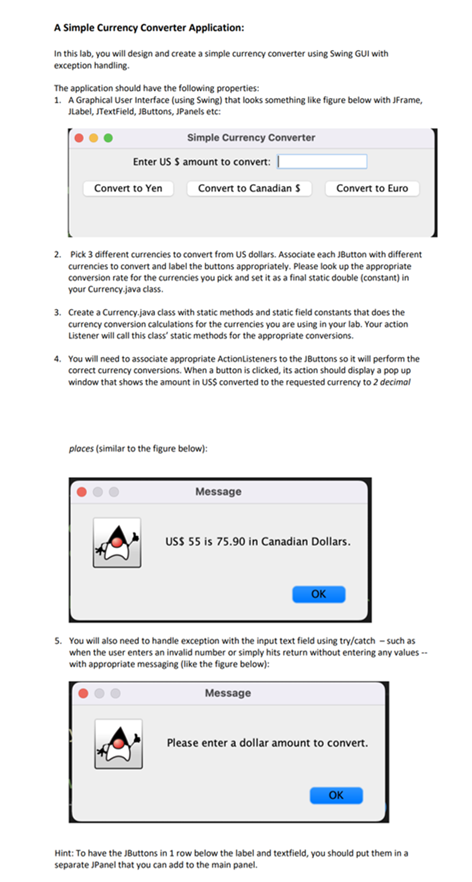
A Graphical User Interface using Swing that looks something like figure below with JFrame,
Jlabel, JTextField, JButtons, JPanels etc:
Pick different currencies to convert from US dollars. Associate each JButton with different
currencies to convert and label the buttons appropriately. Please look up the appropriate
conversion rate for the currencies you pick and set it as a final static double constant in
your Currency.java class.
Create a Currency,java class with static methods and static field constants that does the
currency conversion calculations for the currencies you are using in your lab. Your action
Listener will call this class" static methods for the appropriate conversions.
You will need to associate appropriate Actiontisteners to the JButtons so it will perform the
correct currency conversions. When a button is clicked, its action should display a pop up
window that shows the amount in USS converted to the requested currency to decimol
ploces similar to the figure below:
Message
USS is in Canadian Dollars.
You will also need to handle exception with the input text field using trycatch such as
when the user enters an invalid number or simply hits return without entering any values
with appropriate messaging like the figure below:
Message
Please enter a dollar amount to convert.
OK
Hint: To have the JButtons in row below the label and textfield, you should put them in a
separate JPanel that you can add to the main panel.
Step by Step Solution
There are 3 Steps involved in it
1 Expert Approved Answer
Step: 1 Unlock

Question Has Been Solved by an Expert!
Get step-by-step solutions from verified subject matter experts
Step: 2 Unlock
Step: 3 Unlock
 Study Help