







Question: A small snip code: 1.) Add a ?> to close the PHP block of code, 2. ) and below that add the necessary HTML to
A small snip code:
1.) Add a ?> to close the PHP block of code, 2. ) and below that add the necessary HTML to make it a properly structured HTML5 web page.
?> Point 1
Set the title element of the web page to YourLastName - Lab 1 // keep it like this
In the PHP block of code, set a variable named first_name to your first name and a variable named last_name to your last name. 3)
In the body of the web page, include an h1 element with your last name and the lab number. (4
Below the heading, insert a paragraph. In the first part of the paragraph, include the text Hello, from. Then use embedded PHP with the echo statement and the concatenation operator to display the first_name variable, a space, and the last_name variable. After the PHP, include an exclamation point. (5
Save your changes and close the file.
***////////////************
My example is shown below. Please remember that your page should include PHP variables and a statement that uses concatenation to display the message. Do not just write the message using all HTML.
Browse to your Web site (on the Internet and not the local site) and copy its link.
Open a word processing or text document, paste the link to your site, name the document YourLastNameLab1*, and close the file.
Submit the YourLastNameLab1 document to the corresponding Dropbox.
*Any time you see YourLastName throughout the semester, please use your last name.
***********************************************************/
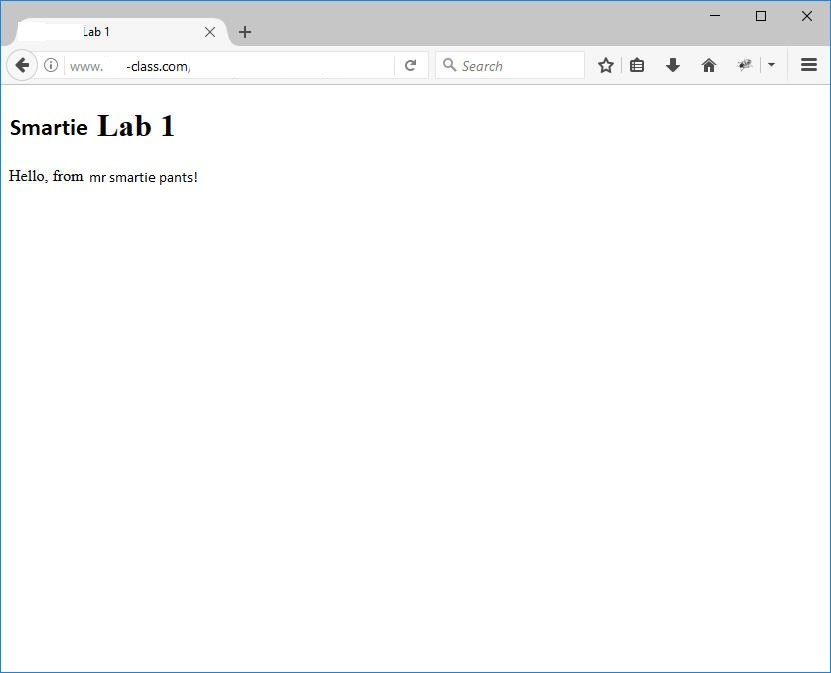
Lab 1 C Search ?) ? Smartie Lab 1 Hello, from mr smartie pants! www. -class.com
Step by Step Solution
There are 3 Steps involved in it

Get step-by-step solutions from verified subject matter experts
 Study Help