







Question: A student is using a spreadsheet model to track monthly income and expenses and also to calculate his annual income. After pressing Ctrl+~, the formula
A student is using a spreadsheet model to track monthly income and expenses and also to calculate his annual income. After pressing Ctrl+~, the formula view of the spreadsheet (shown below) was visible. What spreadsheet construction error did the student commit?
A) Using an advanced Excel formula instead of a simpler mathematical calculation.
B) Entering data in more than one place.
C) Failure to adequately use labels to identify cells.
D) Incorrect formula.
E) There are no errors in the spreadsheet.
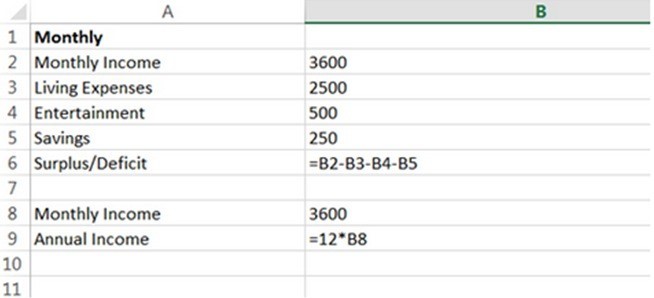
A B 1 Monthly 2 Monthly Income 3600 3 Living Expenses 2500 4 Entertainment 500 5 Savings 250 6 Surplus/Deficit =B2-B3-84-85 7 8 Monthly Income 3600 9 Annual Income =12*B8 10 11
Step by Step Solution
There are 3 Steps involved in it

Get step-by-step solutions from verified subject matter experts
 Study Help