







Question: A sub-query is needed to answer this question. See the notes in the assignment specification document. Write a query to return the following result
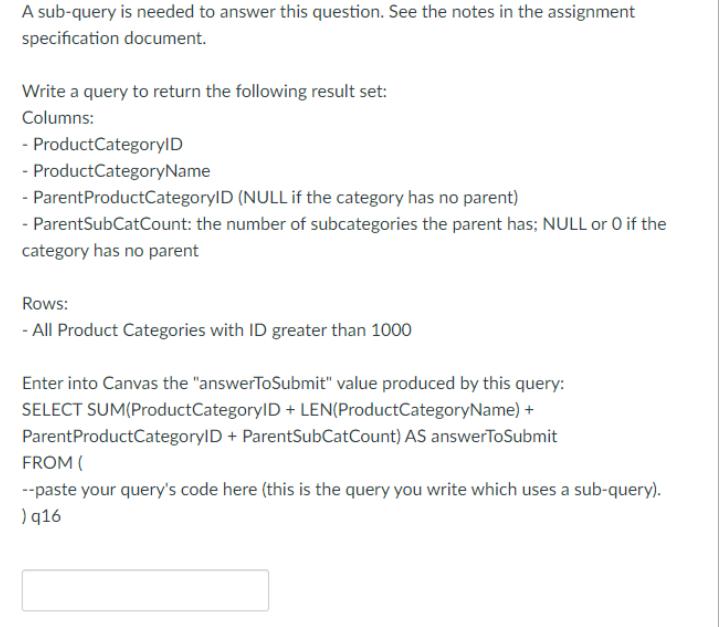
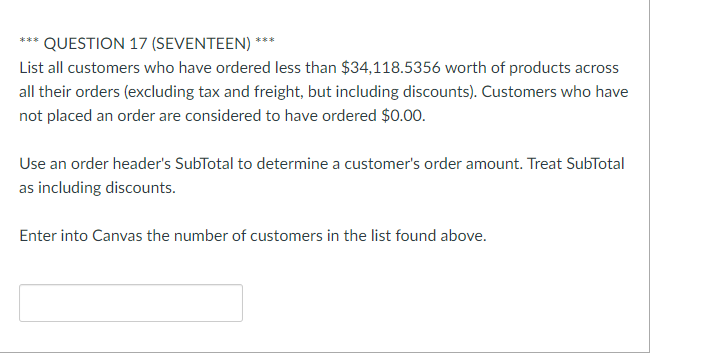
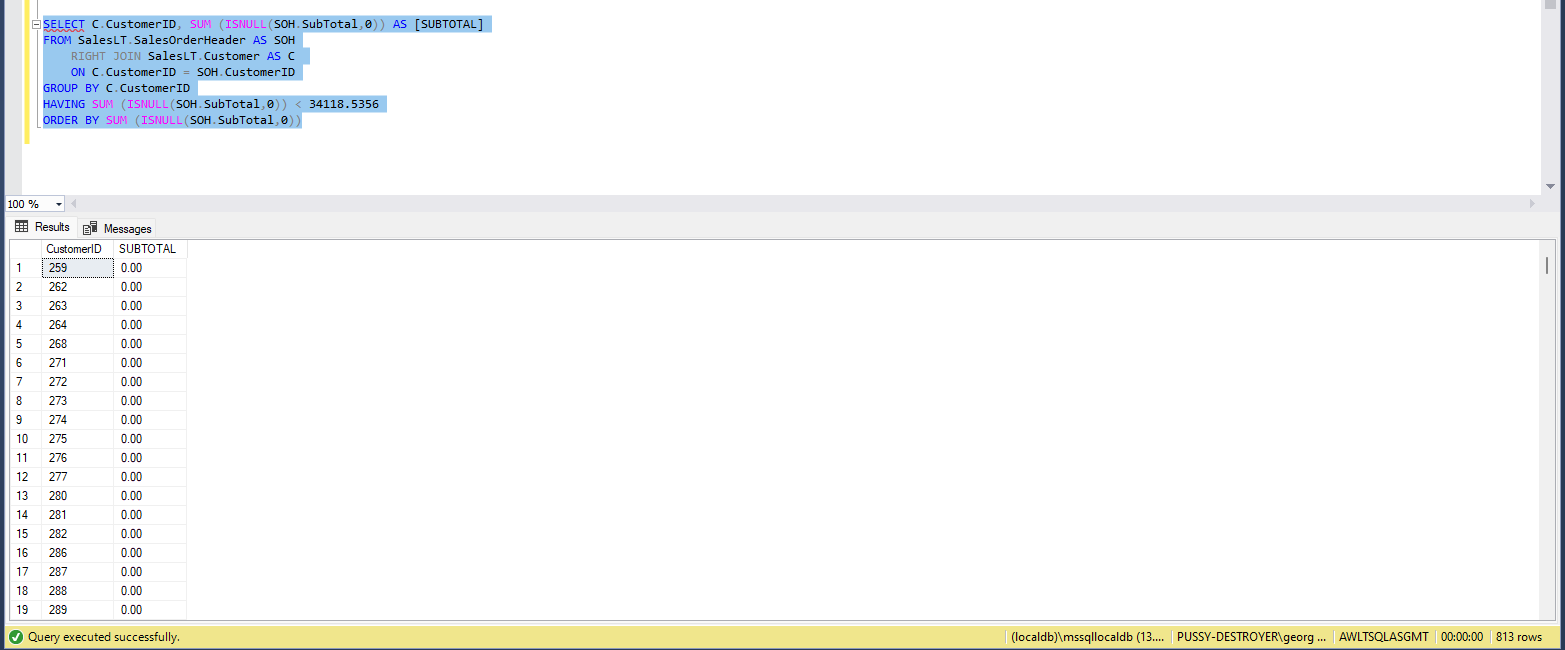
A sub-query is needed to answer this question. See the notes in the assignment specification document. Write a query to return the following result set: Columns: - ProductCategoryID -ProductCategoryName - ParentProductCategoryID (NULL if the category has no parent) - ParentSubCatCount: the number of subcategories the parent has; NULL or O if the category has no parent Rows: - All Product Categories with ID greater than 1000 Enter into Canvas the "answerToSubmit" value produced by this query: SELECT SUM(ProductCategoryID + LEN(ProductCategoryName) + ParentProductCategoryID + ParentSubCatCount) AS answerToSubmit FROM ( --paste your query's code here (this is the query you write which uses a sub-query). ) 916 *** QUESTION 17 (SEVENTEEN) *** List all customers who have ordered less than $34,118.5356 worth of products across all their orders (excluding tax and freight, but including discounts). Customers who have not placed an order are considered to have ordered $0.00. Use an order header's SubTotal to determine a customer's order amount. Treat SubTotal as including discounts. Enter into Canvas the number of customers in the list found above. 100 % SELECT C. CustomerID, SUM (ISNULL(SOH. SubTotal,0)) AS [SUBTOTAL] FROM SalesLT.SalesOrderHeader AS SOH RIGHT JOIN Sales LT. Customer AS C ON C. CustomerID = SOH. CustomerID GROUP BY C. CustomerID HAVING SUM (ISNULL(SOH. SubTotal,0)) < 34118.5356 ORDER BY SUM (ISNULL(SOH. SubTotal, 0) Results Messages CustomerID SUBTOTAL 1 259 0.00 2 262 0.00 3 263 0.00 4 264 0.00 5 268 0.00 6 271 0.00 7 272 0.00 8 273 0.00 9 274 0.00 10 275 0.00 11 276 0.00 12 277 0.00 13 280 0.00 14 281 0.00 15 282 0.00 16 286 0.00 17 287 0.00 18 288 0.00 19 289 0.00 Query executed successfully. (localdb)\mssqllocaldb (13.... | PUSSY-DESTROYER\georg... | AWLTSQLASGMT | 00:00:00 | 813 rows A sub-query is needed to answer this question. See the notes in the assignment specification document. Write a query to return the following result set: Columns: - ProductCategoryID -ProductCategoryName - ParentProductCategoryID (NULL if the category has no parent) - ParentSubCatCount: the number of subcategories the parent has; NULL or O if the category has no parent Rows: - All Product Categories with ID greater than 1000 Enter into Canvas the "answerToSubmit" value produced by this query: SELECT SUM(ProductCategoryID + LEN(ProductCategoryName) + ParentProductCategoryID + ParentSubCatCount) AS answerToSubmit FROM ( --paste your query's code here (this is the query you write which uses a sub-query). ) 916 *** QUESTION 17 (SEVENTEEN) *** List all customers who have ordered less than $34,118.5356 worth of products across all their orders (excluding tax and freight, but including discounts). Customers who have not placed an order are considered to have ordered $0.00. Use an order header's SubTotal to determine a customer's order amount. Treat SubTotal as including discounts. Enter into Canvas the number of customers in the list found above. 100 % SELECT C. CustomerID, SUM (ISNULL(SOH. SubTotal,0)) AS [SUBTOTAL] FROM SalesLT.SalesOrderHeader AS SOH RIGHT JOIN Sales LT. Customer AS C ON C. CustomerID = SOH. CustomerID GROUP BY C. CustomerID HAVING SUM (ISNULL(SOH. SubTotal,0)) < 34118.5356 ORDER BY SUM (ISNULL(SOH. SubTotal, 0) Results Messages CustomerID SUBTOTAL 1 259 0.00 2 262 0.00 3 263 0.00 4 264 0.00 5 268 0.00 6 271 0.00 7 272 0.00 8 273 0.00 9 274 0.00 10 275 0.00 11 276 0.00 12 277 0.00 13 280 0.00 14 281 0.00 15 282 0.00 16 286 0.00 17 287 0.00 18 288 0.00 19 289 0.00 Query executed successfully. (localdb)\mssqllocaldb (13.... | PUSSY-DESTROYER\georg... | AWLTSQLASGMT | 00:00:00 | 813 rows
Step by Step Solution
There are 3 Steps involved in it
select ProductCategoryId ProductCategoryName nvlParentProductCategoryid NULL ParentSubCatCount from ... View full answer

Get step-by-step solutions from verified subject matter experts
 Study Help