







Question: A system, as shown below, is expected to enter a 4-digit password from the user. The first time the program is started, it should say
A system, as shown below, is expected to enter a 4-digit password from the user. The first time the program is started, it should say "Enter password".
When the user enters the 4-digit password and presses the Square key, if the password is 1234, the led connected to b0 should flash and the LCD screen should indicate that you have known the password. If the password is entered incorrectly 3 times, the display should say "BLOCKED".
And then enter the 4-digit "4321" block password. If it enters the blocked password correctly, the led connected to b0 should flash and the LCD should display the password as you know it.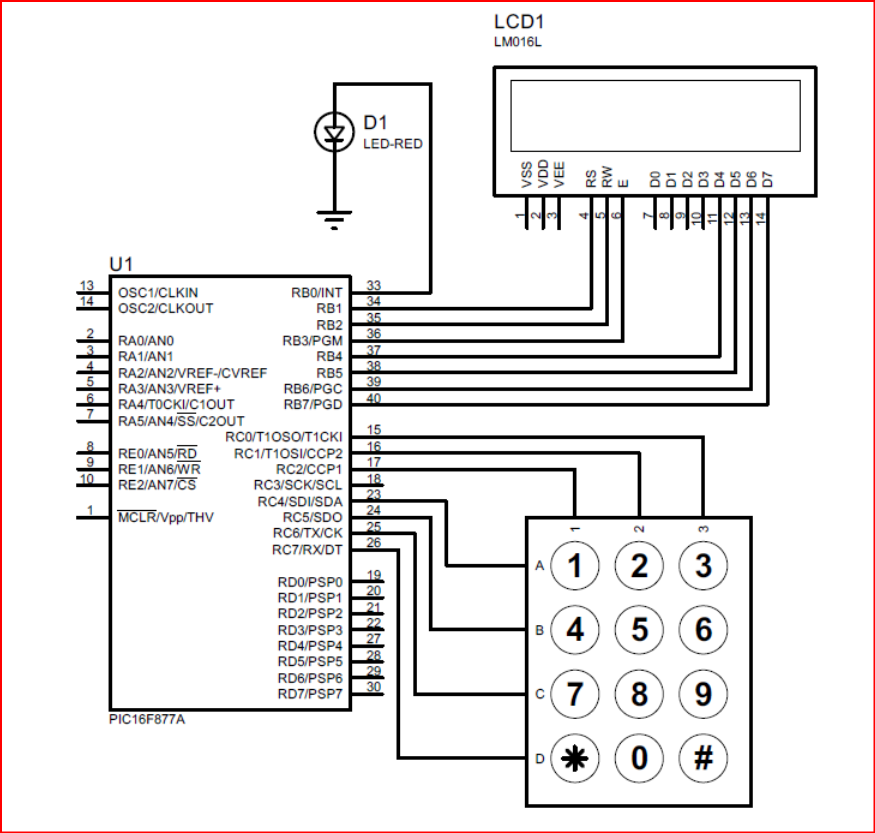
LCD1 LMO16L D1 LED-RED TH 10 12 13 14 33 34 36 37 39 40 U1 13 OSC1/CLKIN RBO/INT OSC2/CLKOUT RB1 RB2 2 | RA0/ANO RB3/PGM 3 RA1/AN1 RB4 RA2/AN2IVREF-ICVREF RB5 5 RA3/AN3/VREF+ RB6/PGC RA4/TOCKI/C10UT RB7/PGD RA5/AN/SS/C2OUT RCO/T1OSO/T1CKI REO/AN5/RD RC1/T10SI/CCP2 RE1/AN6/WR RC2/CCP1 RE/AN7/CS RC3/SCK/SCL RC4/SDISDA MCLRIVpp/THV RC5/SDO RC6/TX/CK RC7/RXDT 15 16 17 18 23 24 25 26 adage A(1 1 2 W) 3 3 RDO/PSPO RD1/PSP1 RD2/PSP2 RD3/PSP3 RD4/PSP4 RD5/PSP5 RD6/PSP6 RD7/PSP7 19 20 21 22 27 28 29 30 B4 5 6 -(7 8 9 PIC16F877A 0 # LCD1 LMO16L D1 LED-RED TH 10 12 13 14 33 34 36 37 39 40 U1 13 OSC1/CLKIN RBO/INT OSC2/CLKOUT RB1 RB2 2 | RA0/ANO RB3/PGM 3 RA1/AN1 RB4 RA2/AN2IVREF-ICVREF RB5 5 RA3/AN3/VREF+ RB6/PGC RA4/TOCKI/C10UT RB7/PGD RA5/AN/SS/C2OUT RCO/T1OSO/T1CKI REO/AN5/RD RC1/T10SI/CCP2 RE1/AN6/WR RC2/CCP1 RE/AN7/CS RC3/SCK/SCL RC4/SDISDA MCLRIVpp/THV RC5/SDO RC6/TX/CK RC7/RXDT 15 16 17 18 23 24 25 26 adage A(1 1 2 W) 3 3 RDO/PSPO RD1/PSP1 RD2/PSP2 RD3/PSP3 RD4/PSP4 RD5/PSP5 RD6/PSP6 RD7/PSP7 19 20 21 22 27 28 29 30 B4 5 6 -(7 8 9 PIC16F877A 0 #
Step by Step Solution
There are 3 Steps involved in it

Get step-by-step solutions from verified subject matter experts
 Study Help