







Question: a. Using the properties window in the VB editor assign the code name wsProb1 to the sheet with tab name Problem 1 S1. b. Using
a. Using the properties window in the VB editor assign the code name wsProb1 to the sheet with tab name "Problem 1 S1".
b. Using VBA code and the code name for worksheet "Problem1 S1", make this worksheet the active sheet.
c. Declare a range variable and assign to this variable the range from A2 to A10 in the worksheet "Problem 1 S1".
d. Write VBA code to create a range name Scores. This range name should refer to the cells B6 to B14 in the worksheet "Problem 1 S2"
e. Write VBA code that uses an Excel worksheet function that calculates the weighted average score (i.e., the dot product of the range defined in part c. and the range in part d. and place the calculated value in cell A12 in worksheet wsProb1.
f. Using VBA code change the background color of cell A12 to blue.
g. Using VBA code change the font type in cell A12 to italic and bold.
h. Using VBA code change the format property of cell A12 so that it is displayed as a number with exactly three digits to the right of the decimal point and at least three digits to the left of the decimal point.
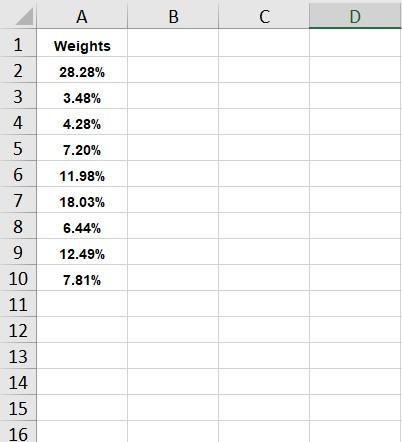
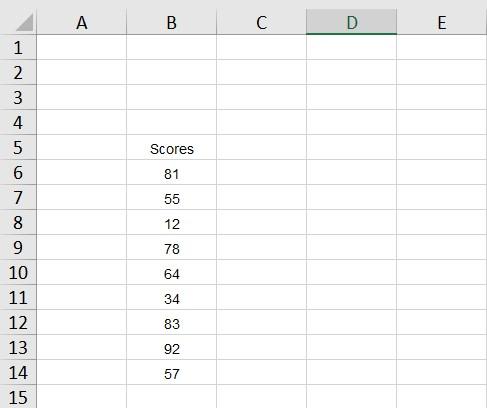
B C D 1 1 A Weights 28.28% 2 3 4 3.48% 4.28% 7.20% 11.98% 18.03% 6.44% 12.49% 7.81% 5 6 7 8 9 10 11 12 13 14 15 16 A . C D E 1 Scores 81 55 1 2 3 4 5 6 7 8 9 10 11 12 13 14 15 12 78 64 34 83 92 57
Step by Step Solution
There are 3 Steps involved in it

Get step-by-step solutions from verified subject matter experts
 Study Help