







Question: A. You will make one WebGL object to render B. It will have the following vertices (X,Y), Z will always be 0 and you may
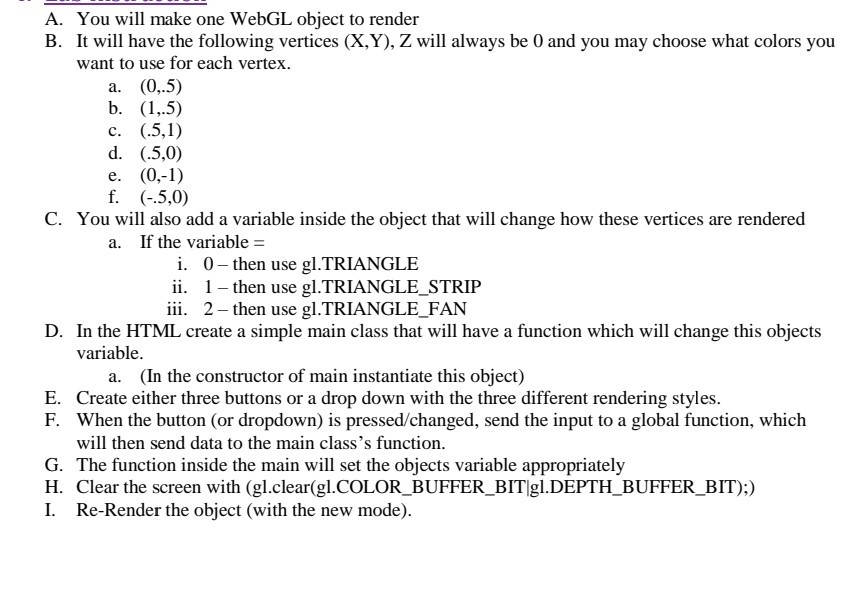
A. You will make one WebGL object to render B. It will have the following vertices (X,Y), Z will always be 0 and you may choose what colors you want to use for each vertex. a. (0,.5) b. (1,5) c. (.5,1) d. (.5,0) e. (0,-1) f. (0.5,0) C. You will also add a variable inside the object that will change how these vertices are rendered a. If the variable = i. 0- then use gl.TRIANGLE ii. 1- then use gl.TRIANGLE_STRIP iii. 2- then use gl.TRIANGLE_FAN D. In the HTML create a simple main class that will have a function which will change this objects variable. a. (In the constructor of main instantiate this object) E. Create either three buttons or a drop down with the three different rendering styles. F. When the button (or dropdown) is pressed/changed, send the input to a global function, which will then send data to the main class's function. G. The function inside the main will set the objects variable appropriately H. Clear the screen with (gl.clear(gl.COLOR_BUFFER_BIT gl.DEPTH_BUFFER_BIT);) I. Re-Render the object (with the new mode). A. You will make one WebGL object to render B. It will have the following vertices (X,Y), Z will always be 0 and you may choose what colors you want to use for each vertex. a. (0,.5) b. (1,5) c. (.5,1) d. (.5,0) e. (0,-1) f. (0.5,0) C. You will also add a variable inside the object that will change how these vertices are rendered a. If the variable = i. 0- then use gl.TRIANGLE ii. 1- then use gl.TRIANGLE_STRIP iii. 2- then use gl.TRIANGLE_FAN D. In the HTML create a simple main class that will have a function which will change this objects variable. a. (In the constructor of main instantiate this object) E. Create either three buttons or a drop down with the three different rendering styles. F. When the button (or dropdown) is pressed/changed, send the input to a global function, which will then send data to the main class's function. G. The function inside the main will set the objects variable appropriately H. Clear the screen with (gl.clear(gl.COLOR_BUFFER_BIT gl.DEPTH_BUFFER_BIT);) I. Re-Render the object (with the new mode)
Step by Step Solution
There are 3 Steps involved in it

Get step-by-step solutions from verified subject matter experts
 Study Help