







Question: AbstractElement 2 D: public void updateAlignment ( ) { if ( this . parent ! = null ) { final float parentScale = this.parent.getStyle (
AbstractElementD:
public void updateAlignment
if thisparent null
final float parentScale this.parent.getStyleStyleSCALE;
this.anchorX thisgetStyleStyleHALIGNMENTanchorparentgetStyleStyleWIDTH parentScale parent.getStyleStyleX parentScale;
this.anchorY thisgetStyleStyleVALIGNMENTanchorparentgetStyleStyleHEIGHT parentScale parent.getStyleStyleY parentScale;
this.offsetX this.getStyleStyleHALIGNMENToffsetthisgetStyleStyleWIDTH this.getStyleStyleX;
this.offsetY this.getStyleStyleVALIGNMENToffsetthisgetStyleStyleHEIGHT this.getStyleStyleY;
this.getChildrenvaluesforEachIElement::updateAlignment;
private void preRenderfinal RenderDEventPre event
Apply transitions and animations before rendering
this.transitions.valuesforEacht tapplythis;
this.animations.valuesforEacht tapplythis;
final MatrixStack matrices event.getDrawContextgetMatrices;
matrices.push;
Reverse MC scaling
final float inverseScale floatF MinecraftClient.getInstancegetWindowgetScaleFactor;
matrices.scaleinverseScale inverseScale, ;
Apply parent's anchor position
matrices.translateanchorX anchorY, f;
Apply scaling style for dimensions, but not position
final float scale this.getStyleStyleSCALE;
matrices.scalescale scale, f;
Apply unscaled offset positions after scaling dimensions
matrices.translateoffsetX scale, offsetY scale, f;
private void postRenderfinal RenderDEventPre event
final MatrixStack matrices event.getDrawContextgetMatrices;
final float scale float MinecraftClient.getInstancegetWindowgetScaleFactor;
matrices.scalescale scale, ;
Render children without scaling back
final Object childrenArr this.children.valuestoArray;
for final Object child : childrenArr
if IElement childisVisible
continue;
IElement childdoRenderevent;
matrices.pop;
public final void doRenderfinal RenderDEventPre event
final MatrixStack matrices event.getDrawContextgetMatrices;
matrices.push;
final float inverseScale floatF MinecraftClient.getInstancegetWindowgetScaleFactor;
matrices.scaleinverseScale inverseScale, ;
preRenderevent;
renderevent;
postRenderevent;
matrices.pop;
public enum Alignment
START
parentSize
elementSize position position
CENTER
parentSize parentSize F
elementSize positionelementSize F position
END
parentSize parentSize,
elementSize positionelementSize position
;
private final IAlignmentAnchorFunction anchorFunction;
private final IAlignmentOffsetFunction offsetFunction;
Alignmentfinal IAlignmentAnchorFunction anchorFunction, final IAlignmentOffsetFunction offsetFunction
this.anchorFunction anchorFunction;
this.offsetFunction offsetFunction;
public final float anchorfinal float parentSize
return this.anchorFunction.anchorparentSize;
public final float offsetfinal float elementSize, final float position
return this.offsetFunction.offsetelementSize position;
public interface IAlignmentAnchorFunction
float anchorfinal float parentSize;
public interface IAlignmentOffsetFunction
float offsetfinal float elementSize, final float position;
Some class:
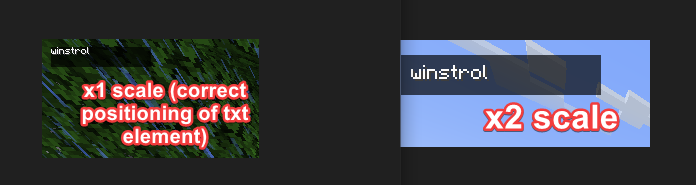
this.watermarkTextElement setStyleStyleTEXT, "winstrol"; this.watermarkBackgroundElement setStyleStyleXFsetStyleStyleYFsetStyleStyleWIDTH, FsetStyleStyleHEIGHT, FsetStyleStyleSCALE, FsetStyleStyleBACKGROUNDCOLOR, new ColorgetRGB; this.watermarkBackgroundElement.addChildwatermarkTextElement; As soon as I uncomment the SCALE part, it breaks. the text element does not render properly...it is supposed to render at the top left of the watermarkBackgroundElement, instead it calculates the position renders it at TWICE needed...ie it renders at "position" x y due to setStyleStyleXFsetStyleStyleYF with scale being but in reality the scale should not affect the x and y like that...idkTHE ISSUE ONLY HAPPENS TO CHILDREN ELEMENTS WHOS PARENTS SCALE IS NOT
Step by Step Solution
There are 3 Steps involved in it
1 Expert Approved Answer
Step: 1 Unlock

Question Has Been Solved by an Expert!
Get step-by-step solutions from verified subject matter experts
Step: 2 Unlock
Step: 3 Unlock
 Study Help