







Question: a.Calculate the forecast for the data using a four-year moving average. b.Use the data to calculate the forecast for period 5 using a four-period weighted
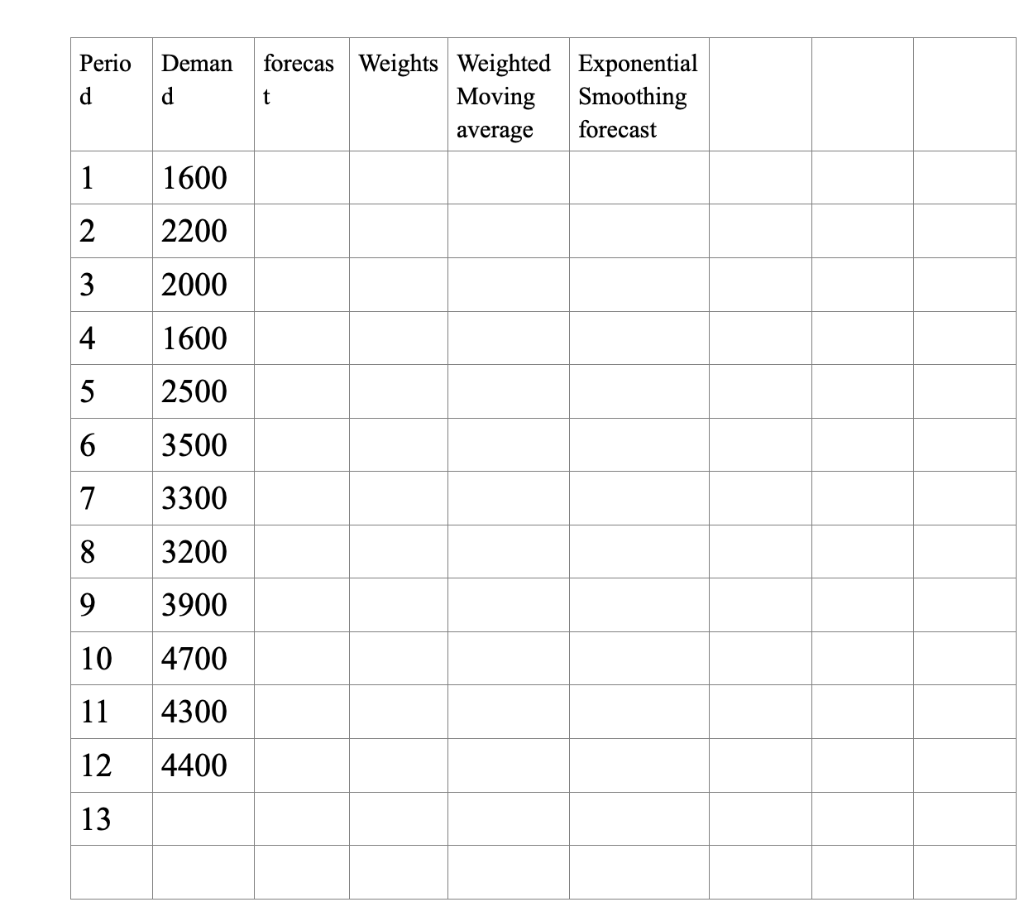
a.Calculate the forecast for the data using a four-year moving average.
b.Use the data to calculate the forecast for period 5 using a four-period weighted average moving average. The weights of .4, .3, .2, and .1 are assigned to the most recent, second most recent, third most recent and the fourth most recent respectively.
c.Based on the data, calculate the forecast from period three using the exponential smoothing method. Assume the forecast for period two is 1600 and
d.Use the data to estimate the linear trend forecast using the simple linear regression to
calculate the trend line and the forecast for period 13 OR estimate the regression equation for period 13.
NOTE!!! In this question, you are required to show all your calculations with formulars for each of the trend lines to enable you estimate or forecast the demand for period 13.
\begin{tabular}{|l|l|l|l|l|l|} \hline Perio d & Deman d & forecas t & Weights & Weighted Moving average & Exponential Smoothing forecast \\ \hline 1 & 1600 & & & & \\ \hline 2 & 2200 & & & & \\ \hline 3 & 2000 & & & & \\ \hline 4 & 1600 & & & & \\ \hline 5 & 2500 & & & & \\ \hline 6 & 3500 & & & & \\ \hline 7 & 3300 & & & & \\ \hline 8 & 3200 & & & & \\ \hline 9 & 3900 & & & & \\ \hline 10 & 4700 & & & & \\ \hline 11 & 4300 & & & & \\ \hline 12 & 4400 & & & & \\ \hline 13 & & & & & \\ \hline & & & & & \\ \hline \end{tabular} \begin{tabular}{|l|l|l|l|l|l|} \hline Perio d & Deman d & forecas t & Weights & Weighted Moving average & Exponential Smoothing forecast \\ \hline 1 & 1600 & & & & \\ \hline 2 & 2200 & & & & \\ \hline 3 & 2000 & & & & \\ \hline 4 & 1600 & & & & \\ \hline 5 & 2500 & & & & \\ \hline 6 & 3500 & & & & \\ \hline 7 & 3300 & & & & \\ \hline 8 & 3200 & & & & \\ \hline 9 & 3900 & & & & \\ \hline 10 & 4700 & & & & \\ \hline 11 & 4300 & & & & \\ \hline 12 & 4400 & & & & \\ \hline 13 & & & & & \\ \hline & & & & & \\ \hline \end{tabular}Step by Step Solution
There are 3 Steps involved in it

Get step-by-step solutions from verified subject matter experts
 Study Help