







Question: Access the Lunar Phase Simulator from the Lunar Phases section of the NAAP Labs Application, click reset, and turn on show time tickmarks. Now,
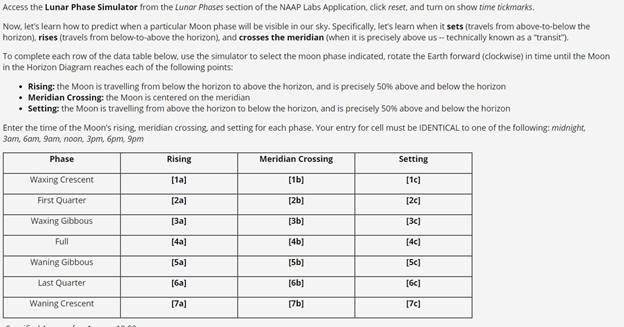
Access the Lunar Phase Simulator from the Lunar Phases section of the NAAP Labs Application, click reset, and turn on show time tickmarks. Now, let's learn how to predict when a particular Moon phase will be visible in our sky. Specifically, let's learn when it sets (travels from above-to-below the horizon), rises (travels from below-to-above the horizon). and crosses the meridian (when it is precisely above us -- technically known as a transit"). To complete each row of the data table below, use the simulator to select the moon phase indicated, rotate the Earth forward (clockwise) in time until the Moon in the Horizon Diagram reaches each of the following points: Rising: the Moon is travelling from below the horizon to above the horizon, and is precisely S0% above and below the horizon Meridian Crossing: the Moon is centered on the meridian Setting: the Moon is travelling from above the horizon to below the horizon, and is precisely 50% above and below the horizon Enter the time of the Moon's rising, meridian crossing, and setting for each phase. Your entry for cell must be IDENTICAL to one of the following: midnight, 3am, 6am, 9am, noon, 3pm, 6pm, 9pm Phase Rising Meridian Crossing Setting Waxing Crescent [1a] [1b) [1c) First Quarter [2a] [2b) [2e] Waxing Gibbous [Ba] [3b) [3c] Full [4a] [4b) [4c) Waning Gibbous [Sa] [5b) [Sc] Last Quarter [6a] [6b] [6c] Waning Crescent [7a] (7b) [7c)
Step by Step Solution
3.47 Rating (157 Votes )
There are 3 Steps involved in it
All the lunar phase data are in tabular form as below From ... View full answer

Get step-by-step solutions from verified subject matter experts
 Study Help