







Question: According to the following narrative table, Create flowchart from determine demand for goods to receive goods processes. Narrative table Entity Purchasing staff Purchasing staff HO
According to the following narrative table, Create flowchart from "determine demand for goods" to "receive goods" processes.
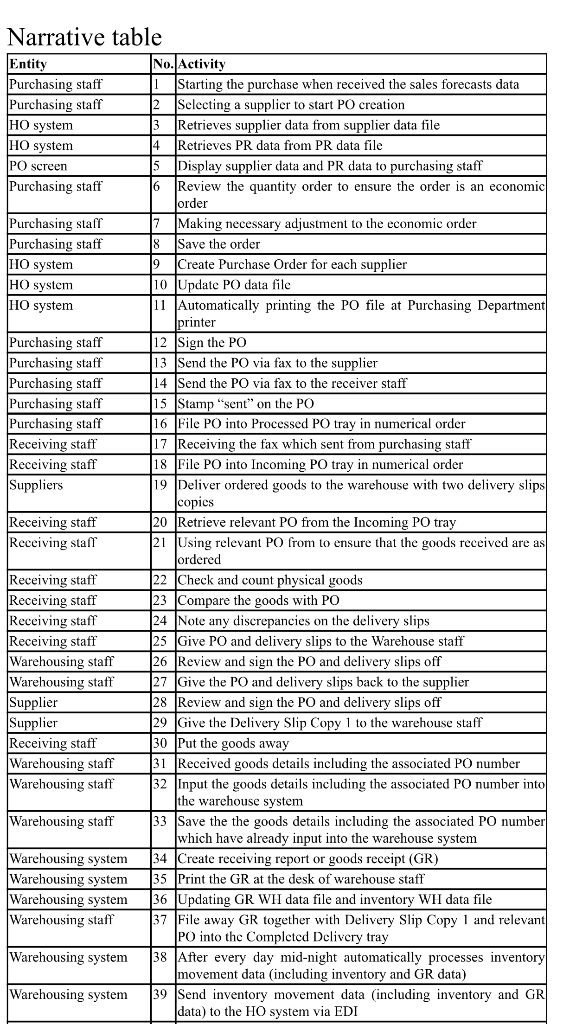
Narrative table Entity Purchasing staff Purchasing staff HO system HO system No.Activity Starting the purchase when received the sales forecasts data Selecting a supplier to start PO creation Retrieves supplier data from supplier data file Retrieves PR data from PR data file Display supplier data and PR data to purchasing staff Review the quantity order to ensure the order is an economic order 4 PO screen Purchasing staff 6 Purchasing staff Purchasing staff HO system HO system HO system Making necessary adjustment to the economic order Save the order Create Purchase Order for each supplier 10 Update PO data file 11 Automatically printing the PO file at Purchasing Department printer Purchasing staff Purchasing staff Purchasing staff Purchasing staff Purchasing staff Receiving staff Receiving staff Suppliers 12 Sign the PO 13 Send the PO via fax to the supplier 14 Send the PO via fax to the receiver staff 15 Stamp "sent" on the PO 16 File PO into Processed PO tray in numerical order 17 Receiving the fax which sent from purchasing staff 18 File PO into Incoming PO tray in numerical order 19 Deliver ordered goods to the warehouse with two delivery slips copies 20 Retrieve relevant PO from the Incoming PO tray 21 Using relevant PO from to ensure that the goods received are as ordered 22 Check and count physical goods Receiving staff Receiving staff Receiving staff Receiving staff Receiving staf Receiving staff Warehousing staff Warehousing staff Supplier Supplier Receiving staff Warehousing staff Warehousing staff 23 Compare the goods with PO 24 Note any discrepancies on the delivery slips 25 Give PO and delivery slips to the Warehouse staff 26 Review and sign the PO and delivery slips off Give the PO and delivery slips back to the supplier 28 Review and sign the PO and delivery slips off 29 Give the Delivery Slip Copy 1 to the warehouse staff 30 Put the goods away 31 Received goods details including the associated PO number 32 Input the goods details including the associated PO number into the warehouse system 33 Save the the goods details including the associated PO number which have already input into the warehouse system 34 Create receiving report or goods receipt (GR) 35 Print the GR at the desk of warehouse staff 36 Updating GR WH data file and inventory WH data file 37 File away GR together with Delivery Slip Copy 1 and relevant PO into the Completed Delivery tray 38 After every day mid-night automatically processes inventory movement data (including inventory and GR data |39 Send inventory movement data (including inventory and GR data) to the HC system via EDI Warehousing staff Warehousing system Warehousing system Warehousing system Warehousing staff Warehousing system Warehousing system Narrative table Entity Purchasing staff Purchasing staff HO system HO system No.Activity Starting the purchase when received the sales forecasts data Selecting a supplier to start PO creation Retrieves supplier data from supplier data file Retrieves PR data from PR data file Display supplier data and PR data to purchasing staff Review the quantity order to ensure the order is an economic order 4 PO screen Purchasing staff 6 Purchasing staff Purchasing staff HO system HO system HO system Making necessary adjustment to the economic order Save the order Create Purchase Order for each supplier 10 Update PO data file 11 Automatically printing the PO file at Purchasing Department printer Purchasing staff Purchasing staff Purchasing staff Purchasing staff Purchasing staff Receiving staff Receiving staff Suppliers 12 Sign the PO 13 Send the PO via fax to the supplier 14 Send the PO via fax to the receiver staff 15 Stamp "sent" on the PO 16 File PO into Processed PO tray in numerical order 17 Receiving the fax which sent from purchasing staff 18 File PO into Incoming PO tray in numerical order 19 Deliver ordered goods to the warehouse with two delivery slips copies 20 Retrieve relevant PO from the Incoming PO tray 21 Using relevant PO from to ensure that the goods received are as ordered 22 Check and count physical goods Receiving staff Receiving staff Receiving staff Receiving staff Receiving staf Receiving staff Warehousing staff Warehousing staff Supplier Supplier Receiving staff Warehousing staff Warehousing staff 23 Compare the goods with PO 24 Note any discrepancies on the delivery slips 25 Give PO and delivery slips to the Warehouse staff 26 Review and sign the PO and delivery slips off Give the PO and delivery slips back to the supplier 28 Review and sign the PO and delivery slips off 29 Give the Delivery Slip Copy 1 to the warehouse staff 30 Put the goods away 31 Received goods details including the associated PO number 32 Input the goods details including the associated PO number into the warehouse system 33 Save the the goods details including the associated PO number which have already input into the warehouse system 34 Create receiving report or goods receipt (GR) 35 Print the GR at the desk of warehouse staff 36 Updating GR WH data file and inventory WH data file 37 File away GR together with Delivery Slip Copy 1 and relevant PO into the Completed Delivery tray 38 After every day mid-night automatically processes inventory movement data (including inventory and GR data |39 Send inventory movement data (including inventory and GR data) to the HC system via EDI Warehousing staff Warehousing system Warehousing system Warehousing system Warehousing staff Warehousing system Warehousing system
Step by Step Solution
There are 3 Steps involved in it

Get step-by-step solutions from verified subject matter experts
 Study Help