







Question: Activate the Rockwell Automation software. Prepare and run a program to suit the following criteria: The diverter gate switches the material from conveyor 1 onto
Activate the Rockwell Automation software.
Prepare and run a program to suit the following criteria:
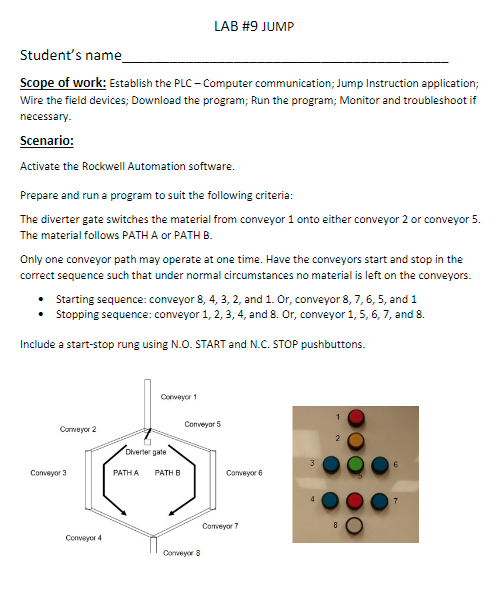
The diverter gate switches the material from conveyor onto either conveyor or conveyor
The material follows PATH A or PATH B
Only one conveyor path may operate at one time. Have the conveyors start and stop in the
correct sequence such that under normal circumstances no material is left on the conveyors.
Starting sequence: conveyor and Or conveyor and
Stopping sequence: conveyor and Or conveyor and
Include a startstop rung using NO START and NC STOP pushbuttons.
Student's name
Scope of work: Establish the PLC Computer communication; Jump Instruction application; Wire the field devices; Download the program; Run the program; Monitor and troubleshoot if necessary.
Scenario:
Activate the Rockwell Automation software.
Prepare and run a program to suit the following criteria:
The diverter gate switches the material from conveyor onto either conveyor or conveyor The material follows PATH A or PATH B
Only one conveyor path may operate at one time. Have the conveyors start and stop in the correct sequence such that under normal circumstances no material is left on the conveyors.
Starting sequence: conveyor and Or conveyor and
Stopping sequence: conveyor and Or conveyor and
Include a startstop rung using NO START and NC STOP pushbuttons.
Convergor
Input field devices involved:
NO STARTPB Local::I.Data
NC STOPPB Local::I.Data
PATHSELECTOR Local::I.Data
Output field devices involved:
GATE Local::OData
CONVEYORLocal::OData
CONVEYORLocal::OData
CONVEYORLocal::OData
CONVEYORLocal::Data
CONVEYORLocal::Data
CONVEYORLocal::Data
CONVEYORLocal::Data
CONVEYORLocal::Data
PATHLIGHT Local::ODatalower red light: PATH A OFF, PATH B ON
Lab report must contain:
Title page
Assignment pages
Print of the program
Wiring diagram.
Step by Step Solution
There are 3 Steps involved in it
1 Expert Approved Answer
Step: 1 Unlock

Question Has Been Solved by an Expert!
Get step-by-step solutions from verified subject matter experts
Step: 2 Unlock
Step: 3 Unlock
 Study Help