







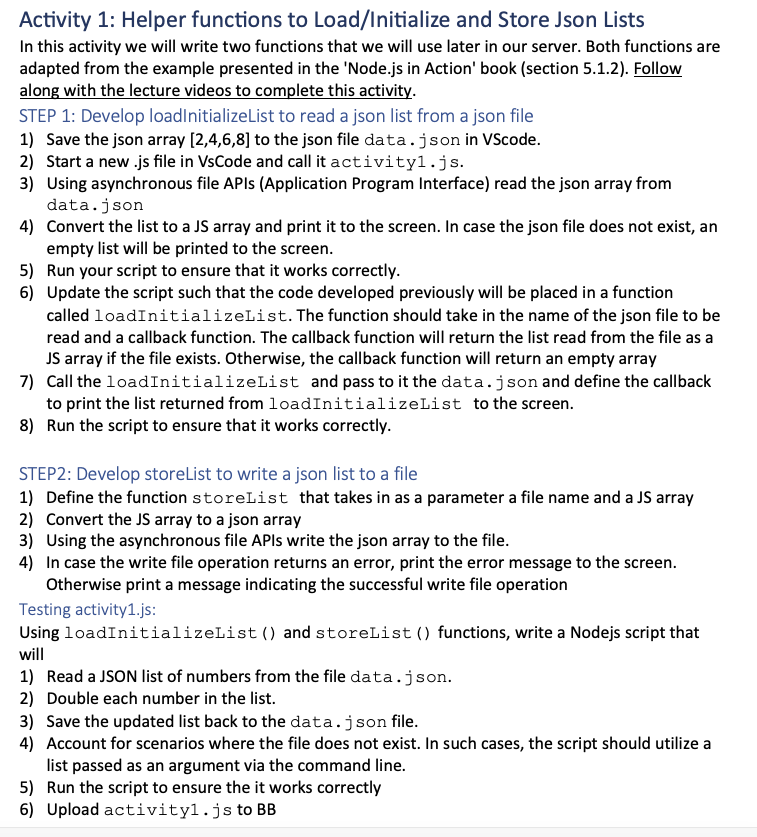
Question: Activity 1 : Helper functions to Load / Initialize and Store Json Lists In this activity we will write two functions that we will use
Activity : Helper functions to LoadInitialize and Store Json Lists
In this activity we will write two functions that we will use later in our server. Both functions are adapted from the example presented in the 'Node.js in Action' book section Follow along with the lecture videos to complete this activity.
STEP : Develop loadInitializeList to read a json list from a json file
Save the json array to the json file data. json in VScode.
Start a new js file in VsCode and call it activityjs
Using asynchronous file APIs Application Program Interface read the json array from data.json
Convert the list to a JS array and print it to the screen. In case the json file does not exist, an empty list will be printed to the screen.
Run your script to ensure that it works correctly.
Update the script such that the code developed previously will be placed in a function called loadInitializeList. The function should take in the name of the json file to be read and a callback function. The callback function will return the list read from the file as a JS array if the file exists. Otherwise, the callback function will return an empty array
Call the loadInitializeList and pass to it the data.json and define the callback to print the list returned from loadInitializeList to the screen.
Run the script to ensure that it works correctly.
STEP: Develop storeList to write a json list to a file
Define the function storeList that takes in as a parameter a file name and a JS array
Convert the JS array to a json array
Using the asynchronous file APIs write the json array to the file.
In case the write file operation returns an error, print the error message to the screen. Otherwise print a message indicating the successful write file operation
Testing activityjs:
Using loadInitializeList and storeList functions, write a Nodejs script that will
Read a JSON list of numbers from the file data.json.
Double each number in the list.
Save the updated list back to the data.json file.
Account for scenarios where the file does not exist. In such cases, the script should utilize a list passed as an argument via the command line.
Run the script to ensure the it works correctly
Upload activityjs to BB
Step by Step Solution
There are 3 Steps involved in it
1 Expert Approved Answer
Step: 1 Unlock

Question Has Been Solved by an Expert!
Get step-by-step solutions from verified subject matter experts
Step: 2 Unlock
Step: 3 Unlock
 Study Help