







Question: Activity 3. Type in the following program. Then, using the Jave API Documentation on Internet (https://docs.oracle.com/en/java/javase/13/docs/api/index.html), try to complete the first line of the code.
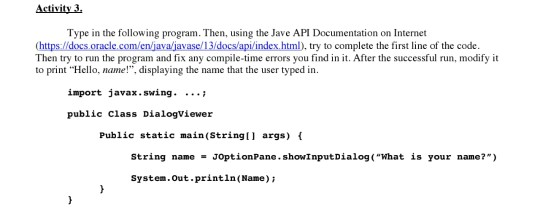
Activity 3. Type in the following program. Then, using the Jave API Documentation on Internet (https://docs.oracle.com/en/java/javase/13/docs/api/index.html), try to complete the first line of the code. Then try to run the program and fix any compile-time errors you find in it. After the successful run, modify it to print "Hello, name!", displaying the name that the user typed in. import javax.swing. ...; public Class Dialogviewer Public static main(String[] args) { String name = J0ptionPane.showInputDialog( "What is your name?") System.Out.println(Name)
Step by Step Solution
There are 3 Steps involved in it
1 Expert Approved Answer
Step: 1 Unlock

Question Has Been Solved by an Expert!
Get step-by-step solutions from verified subject matter experts
Step: 2 Unlock
Step: 3 Unlock
 Study Help