







Question: Add a command to this chapters case study program that allows the user to view the contents of a file in the current working directory.
Add a command to this chapters case study program that allows the user to view the contents of a file in the current working directory. When the command is selected, the program should display a list of filenames and a prompt for the name of the file to be viewed.
Be sure to include error recovery in the program. If the user enters a filename that does not exist they should be prompted to enter a filename that does exist.
An example of the program input and output is shown below:
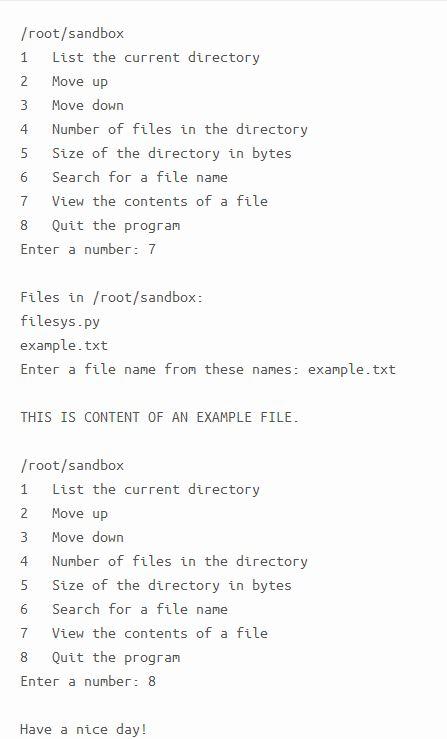
4 /root/sandbox 1. List the current directory 2 Move up 3 Move down Number of files in the directory 5 Size of the directory in bytes 6 Search for a file name 7 View the contents of a file 8 Quit the program Enter a number: 7 Files in /root/sandbox: filesys.py example.txt Enter a file name from these names: example.txt THIS IS CONTENT OF AN EXAMPLE FILE. 1 /root/sandbox List the current directory 2 Move up 3 Move down 4 Number of files in the directory 5 Size of the directory in bytes 6 Search for a file name 7 View the contents of a file 8 Quit the program Enter a number: 8 Have a nice day! 4 /root/sandbox 1. List the current directory 2 Move up 3 Move down Number of files in the directory 5 Size of the directory in bytes 6 Search for a file name 7 View the contents of a file 8 Quit the program Enter a number: 7 Files in /root/sandbox: filesys.py example.txt Enter a file name from these names: example.txt THIS IS CONTENT OF AN EXAMPLE FILE. 1 /root/sandbox List the current directory 2 Move up 3 Move down 4 Number of files in the directory 5 Size of the directory in bytes 6 Search for a file name 7 View the contents of a file 8 Quit the program Enter a number: 8 Have a nice day
Step by Step Solution
There are 3 Steps involved in it

Get step-by-step solutions from verified subject matter experts
 Study Help