







Question: Add one customer record with your last name using an INSERT statement. You may use the name of a celebrity or fictional character if you
Add one customer record with your last name using an INSERT statement.
You may use the name of a celebrity or fictional character if you dont use your own name. Think of this as your signature.
Complete these actions to get to the right place to enter this information: (1) Show databases, (2) use classicmodels, (3) show tables, (4) describe customers;
You should now be seeing all of the fields that youll need to fill in to complete this step.
Reference your Module Two lab or resources on how to populate these fields if you need to.
Fields youll need to populate: customerNumber, customerName, contactLastName, contactFirstName, phone, addressLine1, addressLine2, city, state, postalCode, country, salesRepEmployeeNumber, and creditLimit.
Run a SELECT statement on the customers table, capture it in a screenshot, and put it in your template.
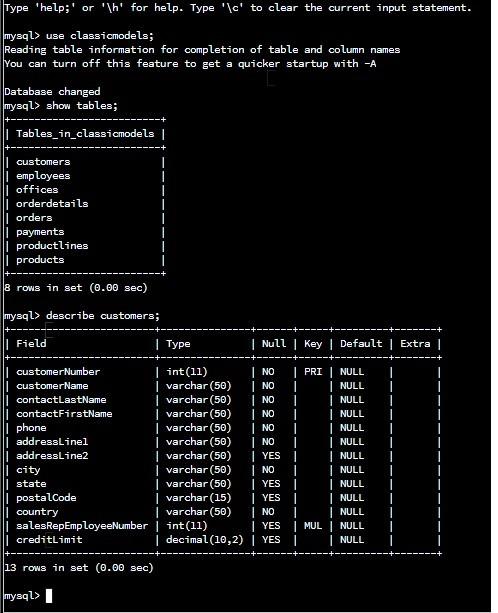
Type 'help;' or ' 1h ' for help. Type ' 1c to clear the current input statement. mysql> use classicmodels; Reading table information for completion of table and column names You can turn off this feature to get a quicker startup with -A Database changed mysql> show tables; Tables_in_classicmodels | 8 rows in set (0.00sec) mysql> describe customers; 13 rows in set (0.00sec) mysq 1>
Step by Step Solution
There are 3 Steps involved in it

Get step-by-step solutions from verified subject matter experts
 Study Help