







Question: Add public static void main(String[] args) method at the bottom of the class WorkLoadDescription with the following functionality: a. Instantiate WorkLoadDescription with the parameter stressTest.txt.
![Add public static void main(String[] args) method at the bottom of](https://dsd5zvtm8ll6.cloudfront.net/si.experts.images/questions/2024/09/66e2f869ab23c_76166e2f8694e160.jpg)
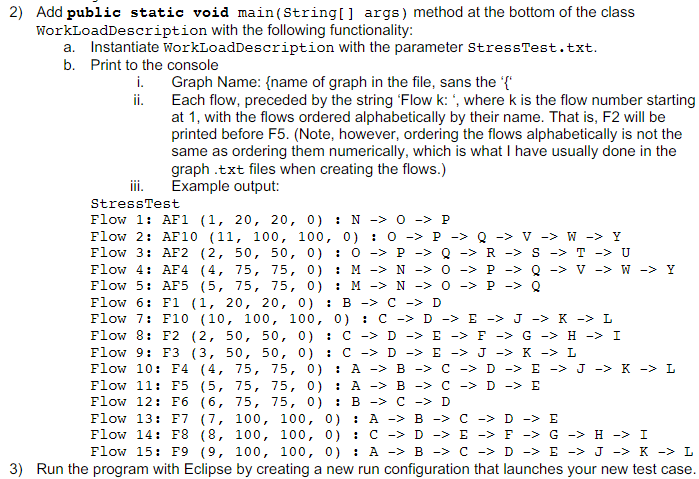
Add public static void main(String[] args) method at the bottom of the class WorkLoadDescription with the following functionality: a. Instantiate WorkLoadDescription with the parameter stressTest.txt. b. Print to the console i. Graph Name: \{name of graph in the file, sans the ' { : ii. Each flow, preceded by the string 'Flow k: ', where k is the flow number starting at 1 , with the flows ordered alphabetically by their name. That is, F2 will be printed before F5. (Note, however, ordering the flows alphabetically is not the same as ordering them numerically, which is what I have usually done in the graph .txt files when creating the flows.) iii. Example output: StressTest Flow 1: AF1 (1,20,20,0):N0P Flow 2: AF10(11,100,100,0):0PQVWY Flow 3: AF2(2,50,50,0):0PQRSTU Flow 4: AF4 (4,75,75,0):MN0PQVWY Flow 5: AF5 (5,75,75,0):MNOPQ Flow 6: F1 (1,20,20,0):BCD Flow 7: F10 (10,100,100,0):CDEJKL Flow 8: F2 (2,50,50,0):CDEFGHI Flow 9: F3 (3,50,50,0):CDEJKL Flow 10: F4 (4,75,75,0):ABCDEJKL Flow 11: F5 (5,75,75,0):ABCDE Flow 12: F6 (6,75,75,0):BCD Flow 13: F7 (7,100,100,0):ABCDE Flow 14: F8 (8,100,100,0):CDEFGHI Flow 15: F9 (9,100,100,0):ABCDEJKL Run the program with Eclipse by creating a new run configuration that launches your new test case
Step by Step Solution
There are 3 Steps involved in it

Get step-by-step solutions from verified subject matter experts
 Study Help