







Question: Add two (2) VerticalStackLayout within the HorizontalStackLayout. Each VerticalStackLayout shall contain one (1) ImageButton and one (1) Label. Assign their names using the x :Name
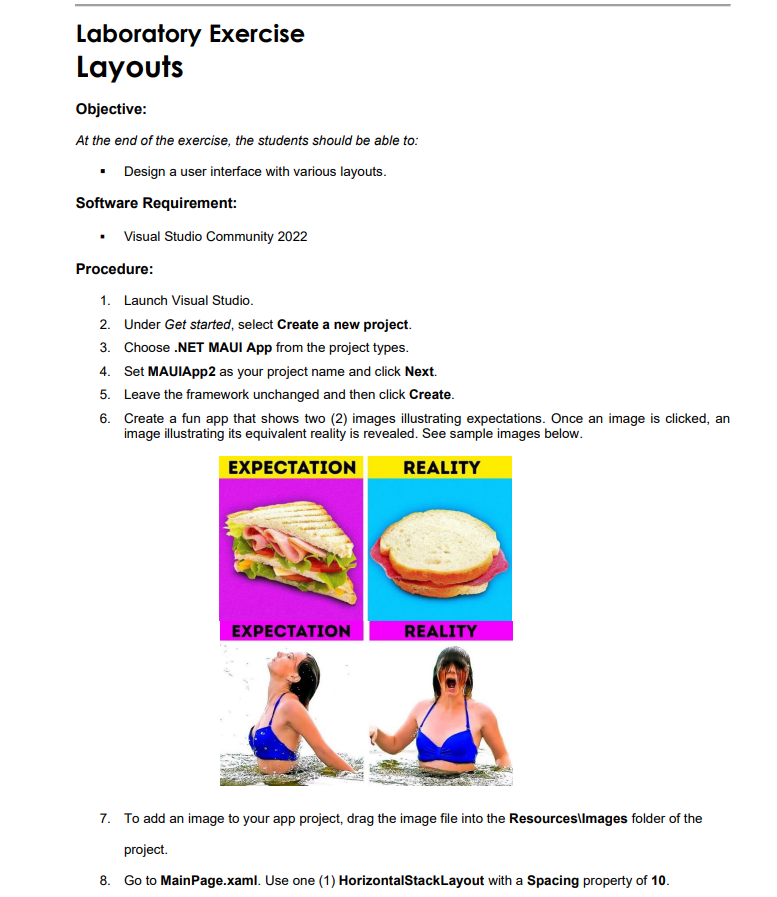 Add two (2) VerticalStackLayout within the HorizontalStackLayout. Each VerticalStackLayout shall contain one (1) ImageButton and one (1) Label. Assign their names using the x :Name property. Set the image source of each ImageButton using the Source property. Ex. Source="old_img1,png" Use HeightRequest and WidthRequest to resize the images. Ex. HeightRequest ="150" Go to MainPage.xaml.cs. Create two (2) methods for your click events. Below is a sample statement to change the image source. ImgBtn. Source = "new_img1.png";
Laboratory Exercise Layouts Objective: At the end of the exercise, the students should be able to: - Design a user interface with various layouts. Software Requirement: - Visual Studio Community 2022 Procedure: 1. Launch Visual Studio. 2. Under Get started, select Create a new project. 3. Choose .NET MAUI App from the project types. 4. Set MAUIApp2 as your project name and click Next. 5. Leave the framework unchanged and then click Create. 6. Create a fun app that shows two (2) images illustrating expectations. Once an image is clicked, an image illustrating its equivalent reality is revealed. See sample images below. 7. To add an image to your app project, drag the image file into the Resourcesllmages folder of the project
Step by Step Solution
There are 3 Steps involved in it

Get step-by-step solutions from verified subject matter experts
 Study Help