







Question: Additional information is given below for each attribute. You should assume attributes are required unless stated otherwise: Movie MID: An auto-generated ID value. Title: A
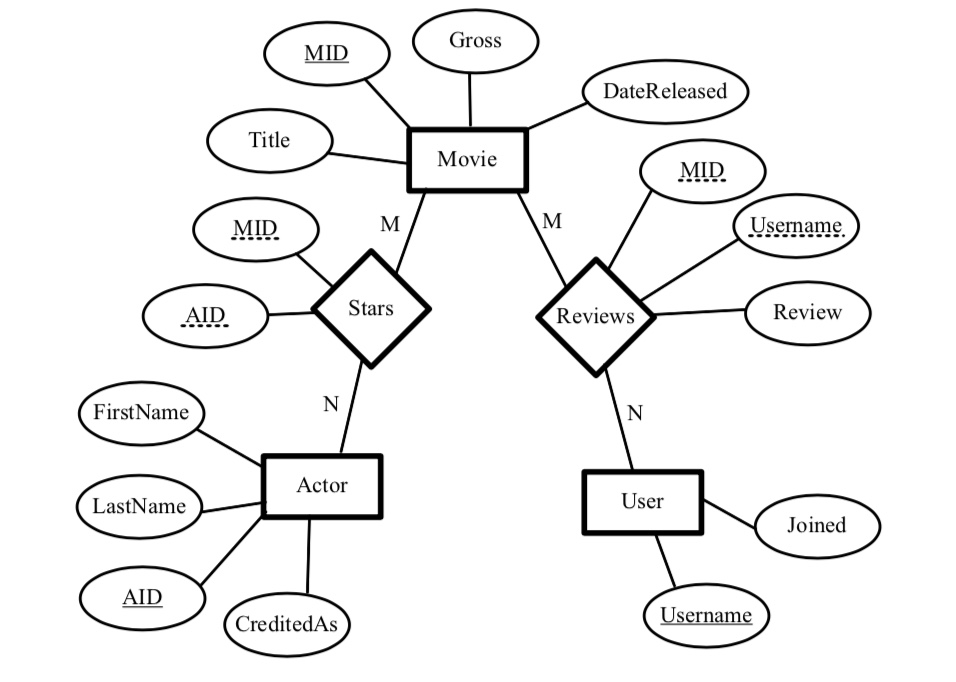
Additional information is given below for each attribute. You should assume attributes are required unless stated otherwise:
Movie MID: An auto-generated ID value. Title: A title that is no longer than 127 characters. Gross: A currency value. Should be capable of holding two decimal places.
DateReleased: A month/day/year value.
Actor
--AID: An auto-generated ID value.
FirstName: A first name. LastName: A last name. CreditedAs: An optional attribute for listing an alternate name an actor is credited as.
User Username: A username.
Reviews Username: A foreign key referencing the username from the User table.
MID: A foreign key referencing the MID from the Movie table.
Review: A textual review of the movie.
Stars MID: A foreign key referencing the MID from the Movie table.
AID: A foreign key referencing the AID from the Actor table.
Building the Database
In SQLite, write the SQL statements to create the MovieReview database outlined in the ER diagram
Can anyone help me create this database in SQLlite? This is what I have so far:
CREATE TABLE Movie (
MID INTEGER PRIMARY KEY AUTOINCREMENT NOT NULL,
Title TEXT NOT NULL,
Gross REAL NOT NULL,
DateReleased TEXT NOT NULL
);
CREATE TABLE Actor (
AID INTEGER PRIMARY KEY AUTOINCREMENT NOT NULL,
FirstName TEXT NOT NULL,
LastName Text NOT NULL,
CreditedAs Text
);
CREATE TABLE User (
Username TEXT PRIMARY KEY NOT NULL,
JOINED DATE NOT NULL
);
CREATE TABLE Reviews (
Review BLOB NOT NULL,
FOREIGN KEY (Username) REFERENCES User (Username),
FOREIGN KEY (MID) REFERENCES Movie (MID)
);
CREATE TABLE Stars (
FOREIGN KEY (AID) REFERENCES ACTOR (AID),
FOREIGN KEY (MID) REFERENCES Movie (MID),
)
;
Gross MID DateReleased Title Movie MID MID Usemame. AID Stars Reviews Review FirstName Actor LastName User Joined AID CreditedAs
Step by Step Solution
There are 3 Steps involved in it

Get step-by-step solutions from verified subject matter experts
 Study Help