







Question: Addressing Table Device R-B-10 WLC-10 Admin LT-1 laptop RADIUS server Instructions G0/0/0.10 G0/0/0.100 G0/0/0.172 Interface management WLAN 10 NIC NIC NIC Address and Prefix
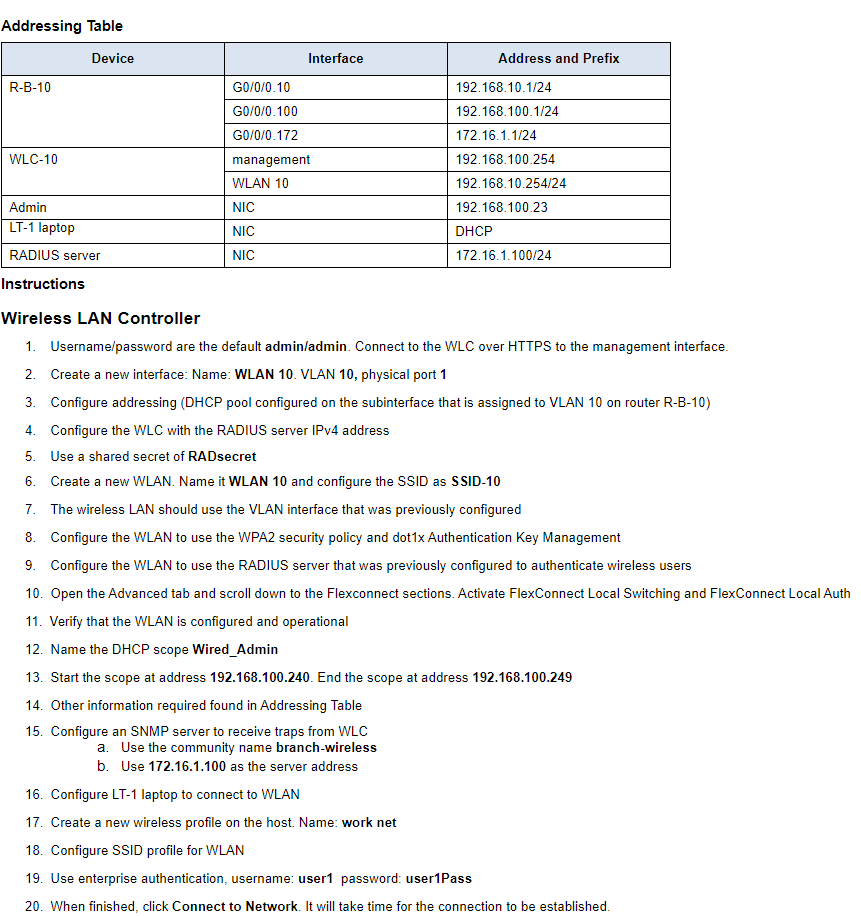
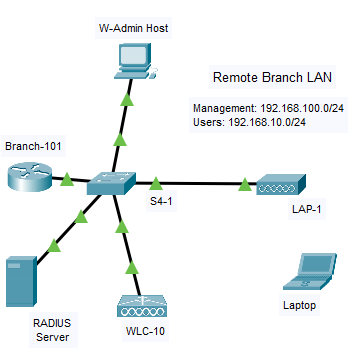
Addressing Table Device R-B-10 WLC-10 Admin LT-1 laptop RADIUS server Instructions G0/0/0.10 G0/0/0.100 G0/0/0.172 Interface management WLAN 10 NIC NIC NIC Address and Prefix 192.168.10.1/24 192.168.100.1/24 172.16.1.1/24 192.168.100.254 192.168.10.254/24 192.168.100.23 DHC 172.16.1.100/24 Wireless LAN Controller 1. Username/password are the default admin/admin. Connect to the WLC over HTTPS to the management interface. 2. Create a new interface: Name: WLAN 10. VLAN 10, physical port 1 3. Configure addressing (DHCP pool configured on the subinterface that is assigned to VLAN 10 on router R-B-10) 4. Configure the WLC with the RADIUS server IPv4 address 5. Use a shared secret of RADsecret 6. Create a new WLAN. Name it WLAN 10 and configure the SSID as SSID-10 7. The wireless LAN should use the VLAN interface that was previously configured 8. Configure the WLAN to use the WPA2 security policy and dot1x Authentication Key Management 9. Configure the WLAN to use the RADIUS server that was previously configured to authenticate wireless users 10. Open the Advanced tab and scroll down to the Flexconnect sections. Activate FlexConnect Local Switching and FlexConnect Local Auth 11. Verify that the WLAN is configured and operational 12. Name the DHCP scope Wired_Admin 13. Start the scope at address 192.168.100.240. End the scope at address 192.168.100.249 14. Other information required found in Addressing Table 15. Configure an SNMP server to receive traps from WLC a. Use the community name branch-wireless b. Use 172.16.1.100 as the server address 16. Configure LT-1 laptop to connect to WLAN 17. Create a new wireless profile on the host. Name: work net 18. Configure SSID profile for WLAN 19. Use enterprise authentication, username: user1 password: user1Pass 20. When finished, click Connect to Network. It will take time for the connection to be established. Branch-101 RADIUS Server W-Admin Host S4-1 o WLC-10 Remote Branch LAN Management: 192.168.100.0/24 Users: 192.168.10.0/24 LAP-1 Laptop
Step by Step Solution
There are 3 Steps involved in it

Get step-by-step solutions from verified subject matter experts
 Study Help