







Question: Adjust a regular expression pattern that validates phone numbers to make it accept more options. The application interface looks like this: Click on the Validate
Adjust a regular expression pattern that validates phone numbers to make it accept more options. The application interface looks like this:
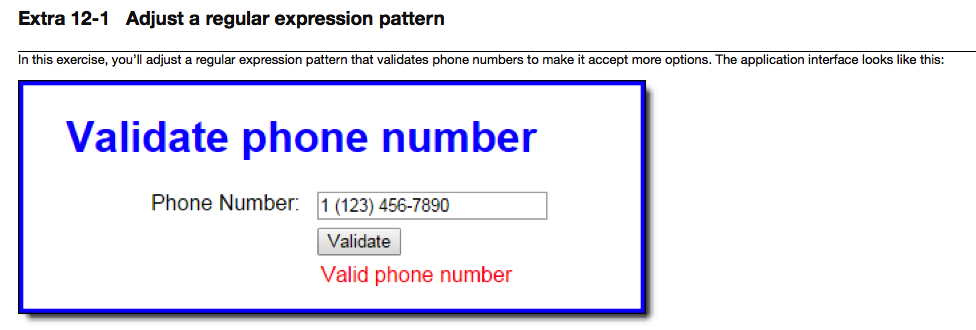
Click on the Validate button and note that the application correctly says the default phone number is in a valid format. Now, change the phone number to look like the one shown above and click Validate again. This time, the application says the phone number is invalid.
In the JavaScript file, note that three functions are supplied. The $ function. The validatePhone function that contains the validation code. And an onload event handler that attaches the validatePhone function to the click event of the Validate button.
Change the regular expression pattern in the pattern variable so the phone number can contain an optional 1- prefix. The best way to do this is to copy the pattern variable to a new line and then comment out the original. This way, you can refer to the original pattern as you adjust it.
When the validation in step 4 is working correctly, change the new pattern so that the phone number can also contain either dashes or periods. Again, its best to make a copy so you can refer to what came before.
When the validation is step 5 is working correctly, change the new pattern so the phone number can have optional parentheses around the area code. To accommodate this change, youll want to allow blank spaces instead of dashes or periods after the optional 1 and after the area code.
index.html:
Validate phone number
regex.css:
body {
font-family: Arial, Helvetica, sans-serif;
background-color: white;
margin: 0 auto;
width: 400px;
border: 3px solid blue;
padding: 0 2em 1em;
}
h1 {
color: blue;
}
label {
float: left;
width: 11em;
text-align: right;
padding-bottom: .5em;
}
input {
margin-left: 1em;
margin-bottom: .5em;
}
#message {
margin-left: 1em;
color: red;
}
regex.js:
"use strict";
var $ = function(id) { return document.getElementById(id); };
var validatePhone = function() {
var phone = $("phone").value;
var pattern = /^\d{3}-\d{3}-\d{4}$/; // 999-999-9999
var isValid = pattern.test(phone);
$("message").firstChild.nodeValue = (isValid) ? "Valid phone number" : "Invalid phone number";
};
window.onload = function() {
$("validate").onclick = validatePhone;
$("phone").value = "123-456-7890"; // set default phone number
};
Extra 12-1 Adjust a regular expression pattern n this exercise, you adjust a regular expression pattern that validates phone numbers to make it accept more options. The application interface looks like this Validate phone number Phone Number 1 (123) 456-7890 Validate Valid phone number
Step by Step Solution
There are 3 Steps involved in it

Get step-by-step solutions from verified subject matter experts
 Study Help