







Question: ADVANCE JAVA PROGRAMMING Hands-on Activity Wake Up! Objective: At the end of the activity, the students should be able to: Create and implement an interface.
ADVANCE JAVA PROGRAMMING
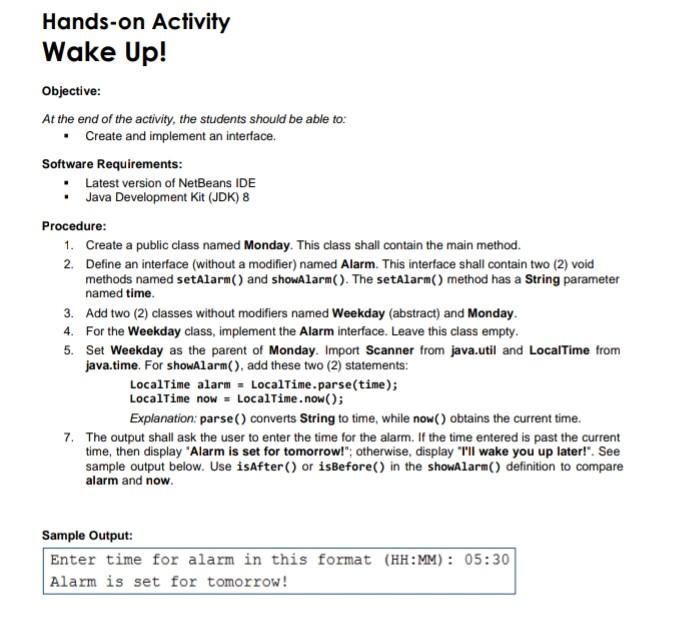
Hands-on Activity Wake Up! Objective: At the end of the activity, the students should be able to: Create and implement an interface. Software Requirements: Latest version of NetBeans IDE . Java Development Kit (JDK) 8 Procedure: 1. Create a public class named Monday. This class shall contain the main method. 2. Define an interface (without a modifier) named Alarm. This interface shall contain two (2) void methods named setAlarm() and showAlarm(). The setAlarm() method has a string parameter named time 3. Add two (2) classes without modifiers named Weekday (abstract) and Monday. 4. For the Weekday class, implement the Alarm interface. Leave this class empty. 5. Set Weekday as the parent of Monday. Import Scanner from java.util and Local Time from java.time. For showAlarm(), add these two (2) statements: LocalTime alarm - LocalTime.parse(time); LocalTime now - LocalTime.now(); Explanation: parse() converts String to time, while now() obtains the current time. 7. The output shall ask the user to enter the time for the alarm. If the time entered is past the current time, then display "Alarm is set for tomorrow!"; otherwise, display "I'll wake you up later!". See sample output below. Use isAfter() or isBefore() in the showAlarm() definition to compare alarm and now Sample Output: Enter time for alarm in this format (HH:MM): 05:30 Alarm is set for tomorrow
Step by Step Solution
There are 3 Steps involved in it

Get step-by-step solutions from verified subject matter experts
 Study Help