







Question: advanced file input/output problem help please Coding Problem 4.4.7 (Advanced) (External resource) (1.0 points possible) Reader.py SubmitRun Grades Reset 10 #proper format -- in a
 advanced file input/output problem help please
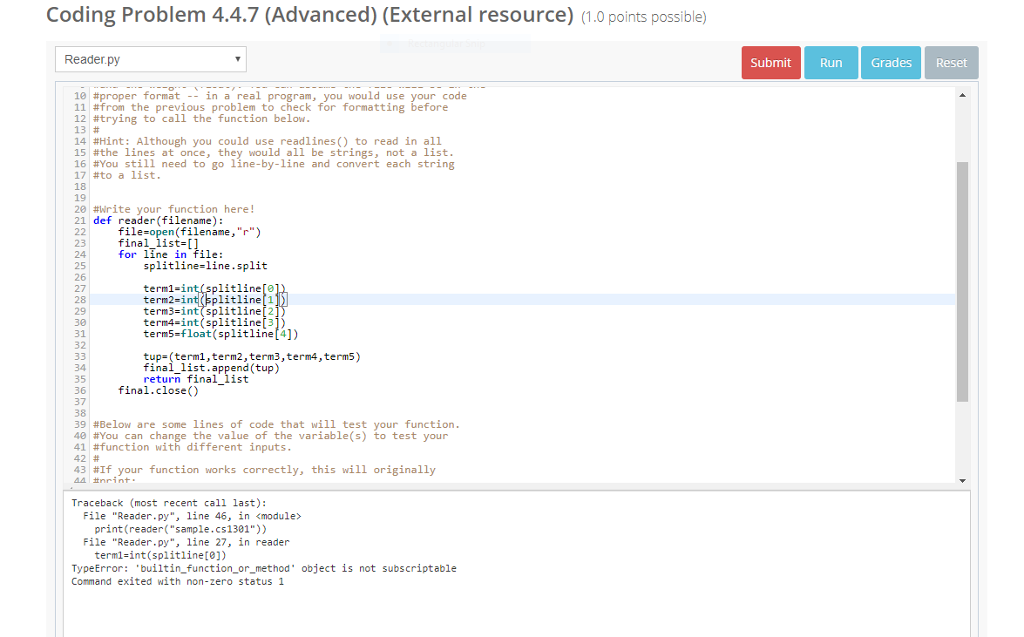
Coding Problem 4.4.7 (Advanced) (External resource) (1.0 points possible) Reader.py SubmitRun Grades Reset 10 #proper format -- in a real program, you would use 11#from the previous problem to check for formatting before 12#trying to call the function below 13# 14 #Hint: Although you could use readlines() to read in all 15 #the lines at once, they would all be strings, not a list 16 #You still need to go line-by-line and convert each string 17#to a list. 18 19 20 #write your function here! 21 def reader(filename) code 22ile-open(filename,"r") 23 final_list [] 24 25 26 27 28 29 30 31 32 for line in file: splitline-line.split term1-int(splitline[o term2-int(splitline[1 term3-int (splitline[2 term4-int (splitline[3]) term5-float (splitline[4]) ura ist.tprend(tup) tup-(term1,term2, term3,term4,term5) final_list.append (tup) return final_list 35 36 final.close() 37 38 39 #Below are some lines of code that will test your function 40 #You can change the value of the variable(s) to test your 41#function with different inputs 42 # 43 #If your function works correctly, this will originally Traceback (most recent call last): File "Reader.py", line 46, in
Step by Step Solution
There are 3 Steps involved in it

Get step-by-step solutions from verified subject matter experts
 Study Help