







Question: After completing Part 3 , you should have solved the initial value problem for the beaker of hot water cooling in a room with a
After completing Part you should have solved the initial value problem for the beaker of hot water cooling in a room with a controlled fixed temperature. Build a complete model, ie differential equation, for the rate of change of the temperature of the
water, in terms of and the function for you determined in # Estimating the constant of
proportionality, in the differential equation can be challenging, so the you determined in the
constant room temperature model is at least a good starting point.
Qualitative analysis encompasses techniques for analyzing differential equations and initialvalue problems
without solving them analytically or numerically.
Create a direction or slope field for the differential equation you have determined,
where is the function you determined in Part Winplot you can download the winplot.exe file
from Blackboard in Technology Tools can draw direction or slope fields for a first order ordinary
differential equation of the form It can also numerically solve initial value problems for
these differential equations.
a Double click on the winplot icon to open, then perform the sequence of clicks Window
dim Equa Differential dydx to open the differential equation dialog box.
b Type the formula for in the box. You will enter where is the function
you determined in Part If you wish, you may use the letter K for the proportionality constant,
then investigate the effect of changing the value of as explained in g Make sure that
slopes is checked. You can adjust the lengths and number of rows of slope segments by
changing the numbers in the corresponding boxes you can also alter the pen widths of these
segments. Click OK to view the slope field.
c You may adjust the graphing window and add labels and markings, by clicking View View...
to open the window which allows you change the part of plane you see. I prefer to set
corners. Click that circle, then set left right down and up Why have
those values been specified? You may also superimpose on the directionslope field the graphs
of one or more equations. It is informative to graph solutions of the ordinary differential
equation on top of the slope field, to see how the solution curves follow the field.
d To solve an initial value problem numerically, first graph the directionslope field as described
Solve your model numerically using the Improved Euler Method and validate your model by comparing
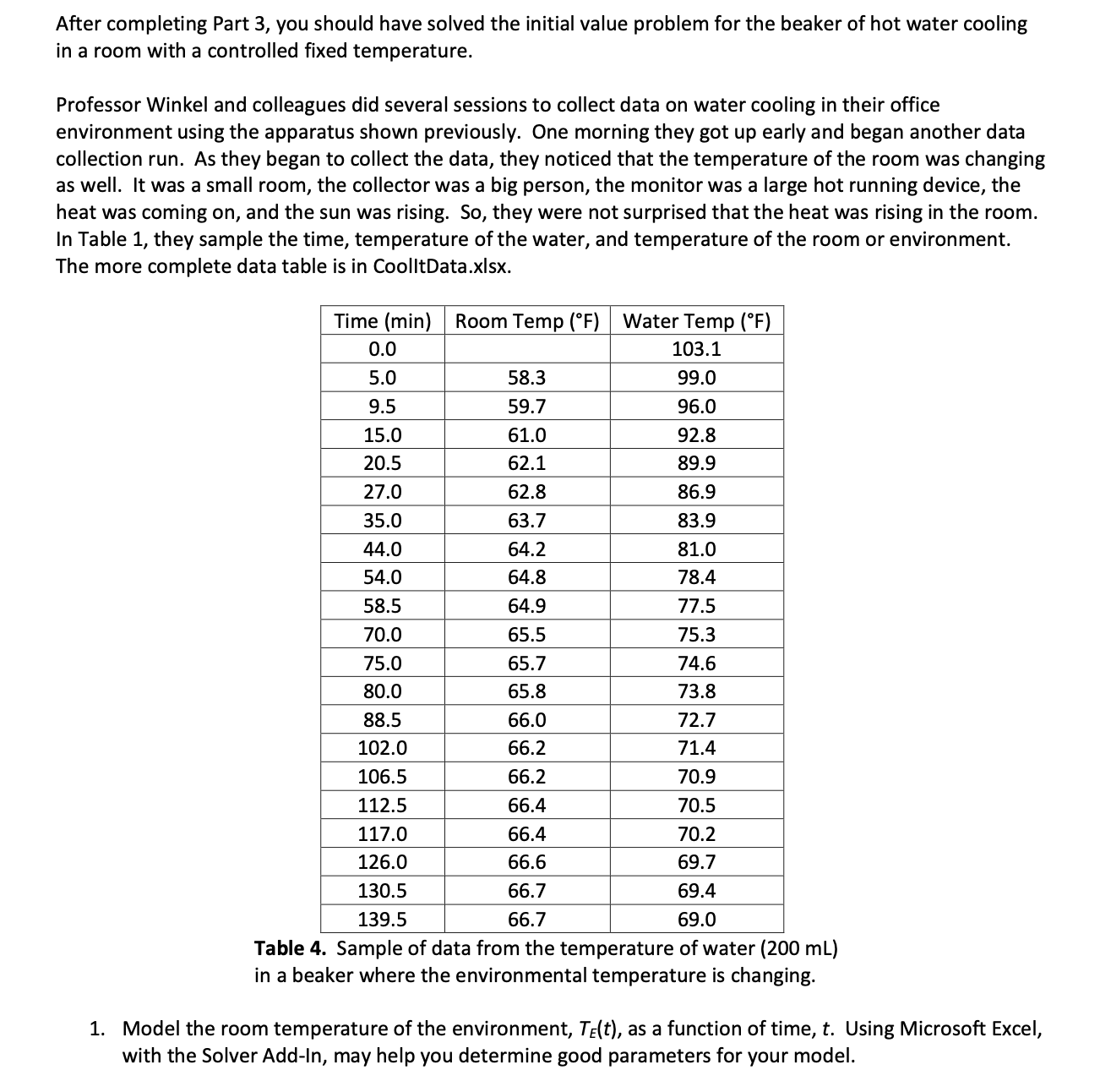
its predictions to the data. If needed, try to improve your estimates of constants in the model.ot running device, the heat was coming on and the sun was rising. So they were not surprised that the heat was rising in the room. In Table they sample the time, temperature of the water, and temperature of the room or environment. The more complete data table is in CoolltData.xlsx
tableTime minRoom Temp deg FWater Temp deg F
Table Sample of data from the temperature of water in a beaker where the environmental temperature is changing.
Model the room temperature of the environment, as a function of time, Using Microsoft Excel, with the Solver AddIn may help you determine good parameters for your model.
Step by Step Solution
There are 3 Steps involved in it
1 Expert Approved Answer
Step: 1 Unlock

Question Has Been Solved by an Expert!
Get step-by-step solutions from verified subject matter experts
Step: 2 Unlock
Step: 3 Unlock
 Study Help