







Question: After running your Solver model and generating a sensitivity report, you must answer the questions listed below in your Excel spreadsheet. Problem 2 - Part
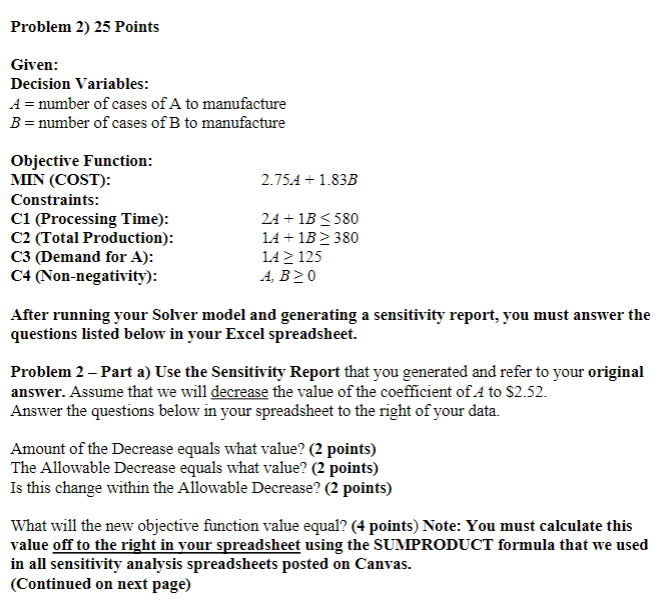
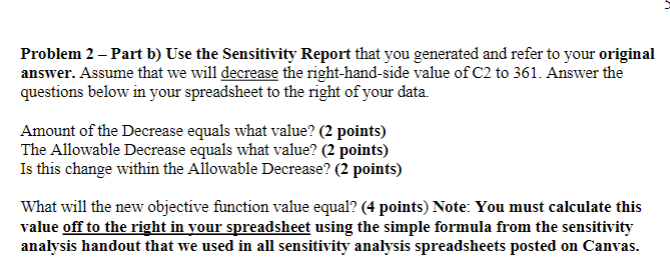
After running your Solver model and generating a sensitivity report, you must answer the questions listed below in your Excel spreadsheet. Problem 2 - Part a) Use the Sensitivity Report that you generated and refer to your original answer. Assume that we will decrease the value of the coefficient of A to $2.52. Answer the questions below in your spreadsheet to the right of your data. Amount of the Decrease equals what value? (2 points) The Allowable Decrease equals what value? (2 points) Is this change within the Allowable Decrease? ( 2 points) What will the new objective function value equal? (4 points) Note: You must calculate this value off to the right in your spreadsheet using the SUMPRODUCT formula that we used in all sensitivity analysis spreadsheets posted on Canvas. (Continued on next page) Problem 2 - Part b) Use the Sensitivity Report that you generated and refer to your original answer. Assume that we will decrease the right-hand-side value of C2 to 361 . Answer the questions below in your spreadsheet to the right of your data. Amount of the Decrease equals what value? (2 points) The Allowable Decrease equals what value? (2 points) Is this change within the Allowable Decrease? (2 points) What will the new objective function value equal? (4 points) Note: You must calculate this value off to the right in your spreadsheet using the simple formula from the sensitivity analysis handout that we used in all sensitivity analysis spreadsheets posted on Canvas
Step by Step Solution
There are 3 Steps involved in it

Get step-by-step solutions from verified subject matter experts
 Study Help