







Question: Again, using the display property, float, clear, and media queries, create an initial prototype design of what you want your overall layout to look like.
Again, using the display property, float, clear, and media queries, create an initial prototype design of what you want your overall layout to look like.
Create the following containers using most of the following elements:
-
footer
-
header
-
section
-
aside
-
div
When using the div elements, use the id attribute to uniquely select them with CSS. Make your layout look like figure 1.
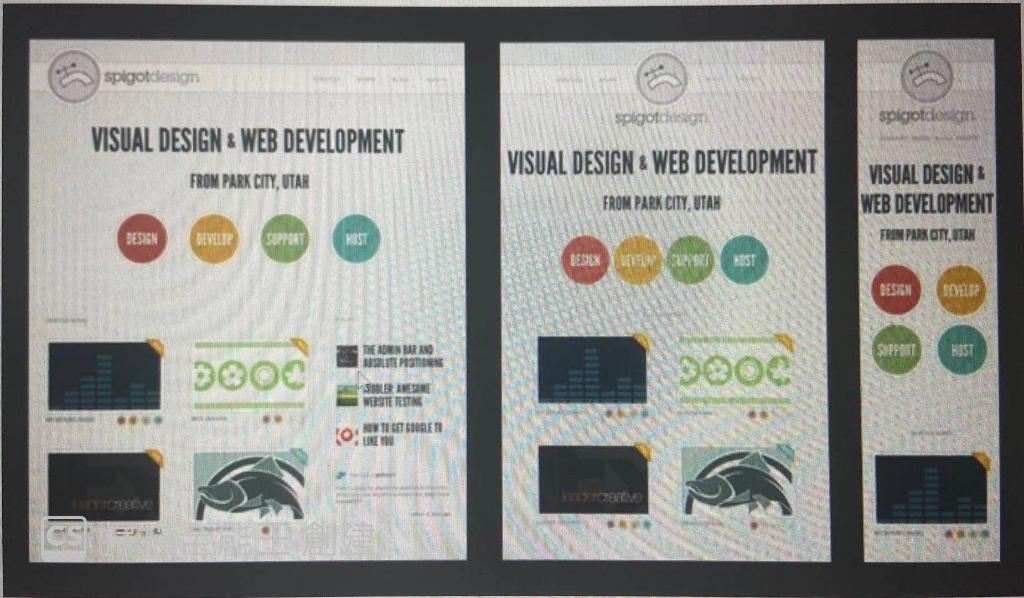
Note that you dont have to use the colors in figure 1 but you do have to lay your content out as such. You can use images or text for them. If you use images, use www.dummyimage.com for your placeholders.
Again, adjust to the different resolutions of:
-
600 pixels
-
1080 pixels
-
1280 pixels
spigotdesign Spigotdesign spigotdosim VISUAL DESIGN & WEB DEVELOPMENT VISUAL DESIGN WEB DEVELOPMENT FROM PARK CITY, UTAH VISUAL DESIGN WEB DEVELOPMENT FROM PARK CITY, UTAH DESIGN DEVELER SUPPORT HRS FREN PAKOTY, TAK BESILNVUOROT DESIGN SOELIE THE BONN BARANO ABSOLUTE POSTING SUPPORT WIT 3000 WEBSITE TESTING NOW 11 GET BOOBLE 10 BE
Step by Step Solution
There are 3 Steps involved in it

Get step-by-step solutions from verified subject matter experts
 Study Help