





Question: AI, please help me develop this assignment as perfect as possible as if I was doing it on Linux in an easy step by step

AI, please help me develop this assignment as perfect as possible as if I was doing it on Linux in an easy step by step way that I can understand to achieve a perfect score in the Deliverable part. My student id is: luiort7125
AI, please help me develop this assignment as
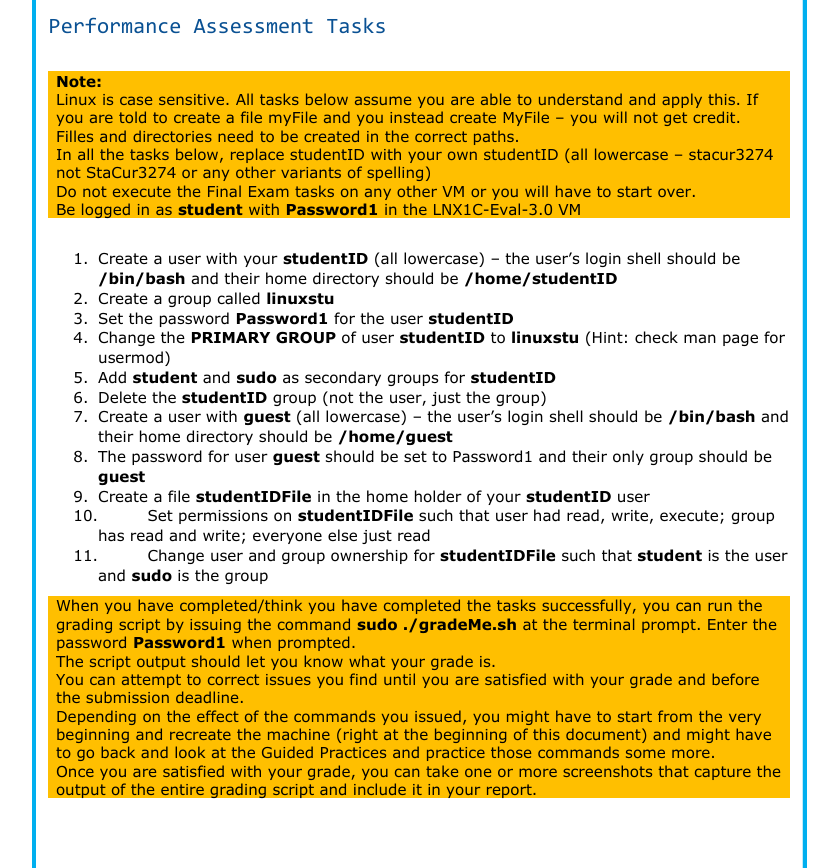
Performance Assessment Tasks Note: Linux is case sensitive. All tasks below assume you are able to understand and apply this. If you are told to create a file myFile and you instead create MyFile - you will not get credit. Filles and directories need to be created in the correct paths. In all the tasks below, replace studentID with your own studentID (all lowercase - stacur3274 not StaCur3274 or any other variants of spelling) Do not execute the Final Exam tasks on any other VM or you will have to start over. Be logged in as student with Password 1 in the LNX1C-Eval-3.0 VM 1. Create a user with your studentID (all lowercase) - the user's login shell should be /bin/bash and their home directory should be /home/studentID 2. Create a group called linuxstu . Set the password Passwordi for the user studentID . Change the PRIMARY GROUP of user studentID to linuxstu (Hint: check man page for usermod) . Add student and sudo as secondary groups for studentID . Delete the studentID group (not the user, just the group) . Create a user with guest (all lowercase) - the user's login shell should be /bin/bash and their home directory should be /home/quest 8. The password for user guest should be set to Password1 and their only group should be guest 9. Create a file studentIDFile in the home holder of your studentID user 10. Set permissions on studentIDFile such that user had read, write, execute; group has read and write; everyone else just read 11. Change user and group ownership for studentIDFile such that student is the user and sudo is the group aon uw & When you have completed/think you have completed the tasks successfully, you can run the grading script by issuing the command sudo ./gradeMe.sh at the terminal prompt. Enter the password Password1 when prompted. The script output should let you know what your grade is. You can attempt to correct issues you find until you are satisfied with your grade and before the submission deadline. Depending on the effect of the commands you issued, you might have to start from the very beginning and recreate the machine (right at the beginning of this document) and might have to go back and look at the Guided Practices and practice those commands some more. Once you are satisfied with your grade, you can take one or more screenshots that capture the output of the entire grading script and include it in your report

Step by Step Solution

There are 3 Steps involved in it

1 Expert Approved Answer
Step: 1 Unlock blur-text-image

Question Has Been Solved by an Expert!

Get step-by-step solutions from verified subject matter experts

Step: 2 Unlock
Step: 3 Unlock

Students Have Also Explored These Related Accounting Questions!