







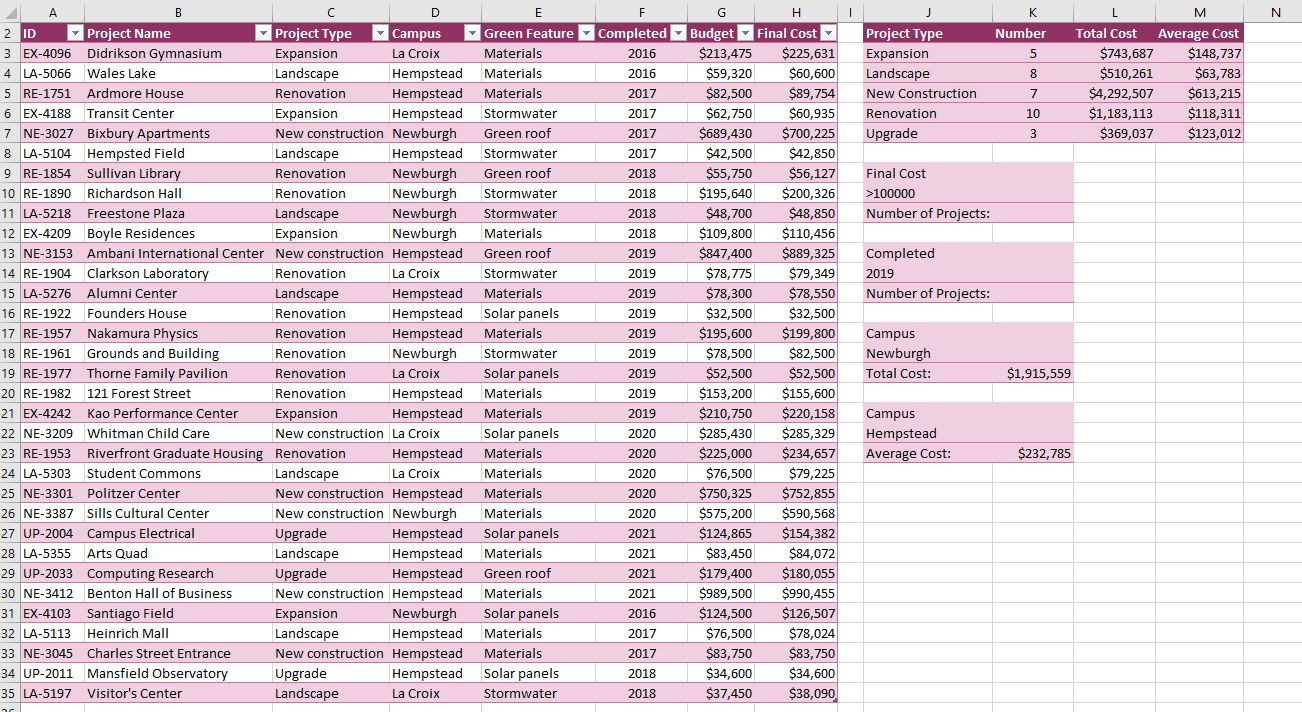
Question: a.In cell K11, enter a formula using the DCOUNT function to count the number of projects with final costs of more than $100,000, using the
a.In cell K11, enter a formula using the DCOUNT function to count the number of projects with final costs of more than $100,000, using the data in the entire Projects table (Projects[#All]) and counting the values in the column of final costs ("Final Cost") that are equal to the values in the range J9:J10.
b.In cell K15, enter a formula using the DCOUNTA function to count the number of projects completed in 2019, using the data in the entire Projects table (Projects[#All]) and counting the values in the column of completion dates ("Completed") that are equal to the values in the range J13:J14.
Step by Step Solution
There are 3 Steps involved in it
1 Expert Approved Answer
Step: 1 Unlock

Question Has Been Solved by an Expert!
Get step-by-step solutions from verified subject matter experts
Step: 2 Unlock
Step: 3 Unlock
 Study Help